
Table of Contents
The Truth About Google Business Profile Suspensions: Protecting Your Business from Unfair Penalties
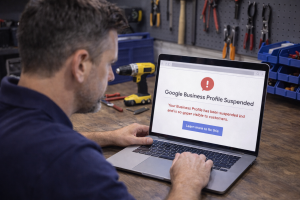
If you’ve ever woken up to find your Google Business Profile suspended without warning, you know the gut punch that follows. Your phone stops ringing. Your Maps listing disappears. And suddenly, the lead flow you’ve been counting on just vanishes.
For appliance repair business owners, a Google Business Profile suspension isn’t just an inconvenience. It’s a revenue emergency. Most of your customers find you through Google Maps or local search. When that listing goes dark, so does your visibility.
The worst part? Many suspensions affect legitimate businesses that didn’t intentionally violate any rules. Google’s automated systems flag profiles for reasons that often make no sense, and the reinstatement process feels like shouting into a void.
This guide will walk you through why suspensions occur, how to prevent them, and what to do if your profile is affected. Everything here comes from working directly with appliance repair companies who’ve dealt with this exact problem.
Why Google Business Profile Suspensions Are Increasing
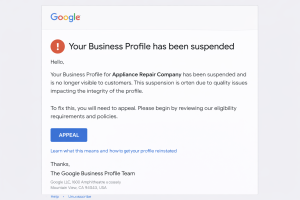
Google has ramped up enforcement over the past two years. The reason is simple: spam and fake listings have flooded Google Maps, particularly in home services categories such as appliance repair, HVAC, and plumbing.
Scammers create fake profiles to rank in local search, steal leads, and resell them to real businesses. Google’s response has been aggressive automated sweeps that flag thousands of profiles at once. Unfortunately, real businesses often get caught in the crossfire.
Here’s what we’ve seen firsthand with appliance repair clients:
Legitimate profiles suspended during algorithmic sweeps. Google’s systems flag patterns that appear suspicious, even when the business is legitimate. Service-area businesses are hit especially hard because they lack a public storefront address.
Suspensions triggered by profile edits. Something as simple as updating your service area or adding a new category can trigger a review. If Google’s system flags your profile, it will be suspended immediately.
Third-party manager access is causing problems. If you’ve given access to a marketing agency, web developer, or anyone else who manages multiple profiles, Google may flag your listing as part of a spam network.
Verification issues for service area businesses. If you’re a mobile appliance repair company without a physical location for customers visit, Google now requires video verification. Many owners struggle with this process and end up suspended.
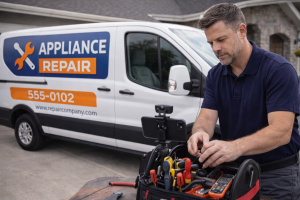
The key thing to understand is that most suspensions aren’t personal. They’re algorithmic. Google’s systems make decisions based on patterns, not human judgment. That’s why prevention and proper setup matter so much.
Common Suspension Triggers for Appliance Repair Businesses
Let’s break down the specific reasons appliance repair profiles get suspended. Some of these are obvious policy violations. Others are technical issues that most business owners don’t even know exist.
Inaccurate or Misleading Business Information
Google wants every piece of information on your profile to be accurate and verifiable. If something doesn’t match, your profile may be flagged.
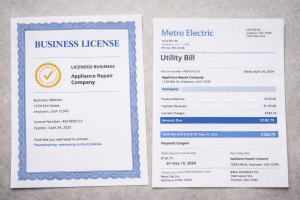
Address inconsistencies. If your business address on Google doesn’t match your website, your business license, or your utility bills, that’s a red flag. For service-area businesses, this can be tricky because you’re not supposed to display a public address at all.
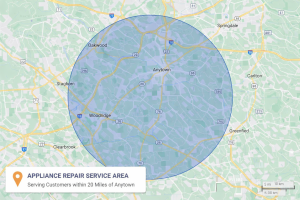
Service area overreach. Claiming you serve 50 cities when you’re a one-truck operation looks suspicious. Google knows how far a service business can realistically travel. If your service area spans three states, expect scrutiny.
Phone number issues. Using a tracking number that forwards to your real line is fine, but using shared call center numbers or numbers not associated with your business can cause issues.
Business hours that don’t make sense. Listing 24/7 availability when you’re clearly not a 24-hour operation can look like spam.
Keyword Stuffing in Your Business Name
This is one of the most common violations we see, and it’s completely avoidable.
Your Google Business Profile name should be your actual business name. Not your business name plus keywords. Not “Joe’s Appliance Repair | Same Day Service | GE Specialist.”
Google’s guidelines are clear: your business name should match what’s on your storefront, your business license, and your website. Adding extra keywords is considered spam, even if competitors are doing it.
We’ve seen dozens of appliance repair profiles suspended for this exact reason. The owners thought they were being smart by adding keywords. Google saw it as manipulation.
If you want to rank for specific services or brands, do it through your business description, services list, and posts. Not your business name.
Duplicate Listings or Multiple Profiles
Google allows one profile per physical location. If you’re a service-area business operating from your home, you receive one profile. Period.
Problems happen when:
You accidentally create a second profile. Maybe you forgot you already had one, or you tried to claim a listing someone else created. Google now shows two profiles for the same business.
You’re trying to rank in multiple cities by creating separate profiles. This is a clear violation. Service area businesses can’t create multiple profiles to cover different territories.
Old listings under previous addresses or business names remain. If you moved or rebranded, you need to update or delete the old profile. Having both active will result in suspension.
Violations of Content Policies
Google has specific rules about what you can and can’t include in your profile content.
Prohibited services. Appliance repair is fine, but if your profile mentions anything that violates Google’s policies (even unintentionally), it can trigger a suspension.
Spammy or promotional language. Your business description should describe what you do, not read like an ad. Phrases like “best appliance repair” or “number one rated service” can be flagged as spam.
Fake or incentivized reviews. If Google detects review manipulation, your entire profile can get suspended. This includes asking customers to leave reviews in exchange for discounts, having employees leave reviews, or using review services.
Algorithmic Sweeps and Automated Flagging
Sometimes, you do everything right and still get suspended. This happens when Google runs automated enforcement sweeps across entire industries or geographic areas.
We observed this across multiple appliance repair clients in 2023 and 2024. Google flagged thousands of home service profiles in certain cities, suspended them all, and required owners to undergo reinstatement.
The frustrating part is that these sweeps don’t distinguish between spam profiles and legitimate businesses. If your profile has any characteristics that match the spam pattern Google is targeting, you get caught in it.
Verification Problems for Service Area Businesses
If you’re a mobile appliance repair company, Google requires video verification. This process involves a live video call where you verify your business’s legitimacy by presenting documentation, tools, and your work vehicle.
Many owners get suspended because:
They missed the verification deadline. Google gives you a limited window to complete verification. If you miss it, your profile gets suspended.
They didn’t have the right documentation ready. Google requires business licenses, utility bills, and proof of your service operations. If you can’t provide it during the call, you fail verification.
They showed the wrong things during the video call. Google has specific requirements about what you need to show. Showing your face or personal information can lead to failure.
Issues with Profile Managers and Third-Party Access
If you’ve given manager access to anyone else, their actions can affect your profile.
Marketing agencies manage hundreds of profiles. If your agency’s account is flagged for spam activity on other clients’ profiles, Google may suspend all profiles it manages, including yours.
Shared access with former employees or contractors. If someone who previously worked for you still has access and makes changes, it can trigger a review.
Bulk editing tools or automation. Some agencies use tools to update multiple profiles at once. Google sees this as spam behavior and suspends profiles managed this way.
How to Prevent Google Business Profile Suspensions
Prevention is always easier than reinstatement. Here’s how to set up and maintain your profile to minimize suspension risk.
Set Up Your Profile Correctly from Day One
Use your real business name. No keywords, no service descriptions, no city names. Just your actual business name as it appears on your license and signage.
Choose accurate business categories. Your primary category should be “Appliance Repair Service” if that’s what you do. Add secondary categories only if they’re genuinely relevant (like “Refrigerator Repair Service” or “Washer & Dryer Repair Service”).
Define a realistic service area. List the cities and zip codes you actually serve regularly. Don’t claim areas you’ve never worked in or can’t realistically reach.
Hide your address if you’re a service area business. If customers don’t come to your location, your address should not be visible on your profile. Google requires this for mobile service businesses.
Use a consistent phone number. The number on your Google profile should match the number on your website and other online listings. Call tracking numbers are fine, but they need to be dedicated to your business.
Write a clear, helpful business description. Explain what you do, what brands you work on, and what areas you serve. Skip the marketing fluff and just be straightforward.
Maintain Your Profile with Regular Updates
Audit your profile monthly. Check that all information is still accurate. Look for changes you didn’t make; they may indicate unauthorized access or a duplicate profile.
Update your hours for holidays and schedule changes. Inaccurate hours frustrate customers and can appear negligent to Google.
Add high-quality photos regularly. Photos of your work, truck, and team help demonstrate that your business is real and active.
Post updates when it makes sense. Google Posts can boost engagement, but only if they’re relevant. Don’t post just to post.
Respond to reviews promptly and professionally. Engagement signals help, but more importantly, they show Google that your business is actively managed.
Handle Verification the Right Way
If Google asks you to verify or re-verify your profile, treat it as urgent.
Complete verification as soon as possible. Don’t wait until the last day. Technical issues happen, and you don’t want to miss the deadline.
For video verification, prepare your documentation in advance. Have your business license, a recent utility bill showing your business name, photos of your service vehicle with your business name visible, and photos of your tools and equipment ready to show on camera.
During the video call, show what Google asks for and nothing else. Don’t show your face, personal documents, or your home interior. Stick to business-related items only.
If you’re asked to prove your service area, have examples ready. Show invoices, service records, or customer testimonials from the areas you claim to serve.
Manage Access Carefully
Limit who has manager access to your profile. Grant access only to people who genuinely need it, and revoke access immediately when someone leaves your company.
If you work with a marketing agency, ask about their profile management practices. Make sure they’re not using bulk editing tools or managing your profile alongside hundreds of others in ways that could trigger spam flags.
Check your managers list regularly. Go into your Google Business Profile settings and verify that only authorized people have access.
Stay Within Google’s Guidelines
Google’s policies change, and staying compliant means staying informed.
Never buy or incentivize reviews. It’s not worth the risk. Build your review count organically by asking satisfied customers for reviews.
Don’t stuff keywords anywhere. Not in your business name, not in your description, not in your posts. Use natural language that describes your business accurately.
Avoid claiming services you don’t actually offer. If you only offer appliance repair, don’t add HVAC or plumbing categories just to increase visibility.
Don’t create multiple profiles for the same business. Even if you think it will help you rank in more areas, it won’t. It will get you suspended.
What to Do If Your Profile Gets Suspended
Despite your best efforts, suspensions can still happen. Here’s how to handle it.
Step 1: Don’t Panic, But Act Fast
When you get the suspension notice, you typically have a limited window to appeal. Google previously allowed multiple appeals over weeks or months. Now, many suspensions come with a single appeal opportunity and a tight deadline.
Check your email and your Google Business Profile dashboard immediately. Look for any communication from Google explaining the reason for the suspension and the appeal process.
Step 2: Identify the Suspension Reason
Google usually provides a reason, but it’s often vague. Common reasons listed include:
“Your business doesn’t meet our guidelines”
“Suspicious activity detected”
“Verification required”
“Quality issues”
If the reason isn’t clear, think about recent changes you made to your profile. Did you update your service area? Add new categories? Change your business name? Any of these could have triggered a review.
Also consider whether you’ve been following all the guidelines covered earlier. Keyword stuffing, duplicate listings, and verification issues are the most common culprits for appliance repair businesses.
Step 3: Gather Your Evidence
If you’re going to appeal, you need documentation that proves your business is legitimate and compliant.
Business license or registration. This proves you’re a real, legal business.
Utility bill or lease agreement. This proves your business operates from the address you claim (even if it’s not public-facing).
Photos of your service vehicle. Show your truck or van with your business name, logo, and phone number visible.
Photos of your tools and equipment. Appliance repair tools, diagnostic equipment, parts inventory. Anything that proves you actually do this work.
Customer invoices or service records. Proof that you’ve been serving the areas you claim.
Website and social media links. Show that your business has an established online presence beyond Google.
Organize everything into a clear, easy-to-follow format. You may only get one shot at this, so make it count.
Step 4: Submit Your Appeal
Navigate to the appeal form provided in your suspension notice. If there’s no direct link, go to your Google Business Profile dashboard and look for appeal options.
Write a clear, concise explanation. Don’t ramble or get emotional. State that your business is legitimate, explain what you do, and reference the documentation you’re providing.
Attach your evidence. Upload everything you gathered in step 3.
Address the suspension reason directly. If Google said your business name violates guidelines, explain that you’ve corrected it. If they flagged your service area, explain why your coverage is accurate.
Be professional and respectful. Google’s reviewers are human (usually). Blaming them or complaining about the process won’t help.
Step 5: Wait, But Don’t Stop Working
Appeal reviews can take anywhere from a few days to several weeks. During this time:
Don’t create a new profile. This will make things worse and could result in a permanent ban.
Focus on other lead sources. Double down on Google Ads, your website SEO, referrals, and any other channels that bring you business.
Keep your documentation updated. If your appeal gets rejected and you’re allowed to resubmit, you’ll want the most current proof available.
Step 6: If Your Appeal Is Denied
Some appeals get rejected, even when the business is legitimate. If this happens:
Look for additional appeal options. Sometimes Google provides a secondary review process or allows you to request human review.
Consider working with a Google Business Profile expert. There are specialists who focus specifically on reinstatements and have relationships with Google support. This costs money, but it can be worth it if your business depends on local search visibility.
Document everything and try again. If you’re given another chance to appeal, use what you learned from the first attempt to strengthen your case.
Step 7: Once Reinstated, Lock Down Your Profile
If you successfully get your profile back:
Fix whatever caused the suspension. If it were your business name, change it. If it were your service area, adjust it. Don’t make the same mistake twice.
Tighten your profile management. Limit who has access, audit your settings, and commit to following Google’s guidelines exactly.
Monitor your profile closely for the next few months. Reinstated profiles sometimes get flagged again if Google’s systems detect similar patterns.
Building a Suspension-Proof Google Business Profile Strategy
The best way to deal with suspensions is to avoid them in the first place. Here’s how to build a profile strategy that prioritizes compliance and long-term stability.
Treat Your Profile Like a Business Asset, Not a Marketing Hack
Too many appliance repair owners see their Google Business Profile as a place to game the system. They stuff keywords, exaggerate service areas, and push the boundaries of Google’s rules.
This might work for a while, but it’s not sustainable. Google’s enforcement is becoming stricter, and penalties are becoming harsher.
Instead, treat your profile as a legitimate representation of your business. Accurate information, honest descriptions, and genuine customer engagement will always outperform shortcuts in the long run.
Integrate Compliance Into Your Marketing Workflow
Make profile audits part of your regular business routine. Once a month, log into your Google Business Profile and check:
Is all information still accurate?
Are there any unauthorized changes?
Are your photos and posts up to date?
Have you responded to recent reviews?
This takes 10 minutes and can prevent major problems.
Use Google Ads and Local Services Ads as Backup
Your Google Business Profile is critical, but it shouldn’t be your only source of leads. If you’re suspended, you need alternative ways to stay visible in Google search results.
Google Ads Search campaigns let you show up at the top of search results even if your Maps listing is down. You’re paying per click, but you’re still getting in front of customers searching for appliance repair.
Local Services Ads give you a green checkmark and top placement in local search. Google verifies your business through background checks and license verification, which can actually help protect your profile from spam-related suspensions.
Having both running alongside your organic Maps presence means a suspension won’t completely stop your lead flow.
Work With a Marketing Partner Who Understands Compliance
If you’re working with an agency or marketing company, make sure they understand Google’s rules and manage your profile correctly.
Ask them:
How many profiles do they manage from their account?
Do they use any automation or bulk editing tools?
Have any of their clients been suspended?
How do they handle verification and compliance?
If they can’t answer these questions clearly, or if they’re pushing tactics that sound too aggressive, find someone else.
At Appliance Marketing Pros, we’ve worked with dozens of appliance repair companies through suspension issues, verification problems, and profile optimization. We know what works, what doesn’t, and how to keep your profile safe while still driving results.
Final Thoughts: Protecting Your Business Starts with Smart Profile Management
Google Business Profile suspensions are frustrating, disruptive, and often unfair. But they’re also preventable in most cases.
By setting up your profile correctly, maintaining it consistently, and staying within Google’s guidelines, you can minimize your risk and protect one of your most valuable marketing assets.
If you’re currently dealing with a suspension, don’t wait. Gather your documentation, submit your appeal, and act promptly. The longer your profile stays down, the more revenue you lose.
And if you need help, whether it’s optimizing your profile, appealing a suspension, or building a more reliable lead generation system, we’re here. Appliance Marketing Pros specializes in helping appliance repair companies grow through Google Ads, local SEO, and smart profile management.
Ready to protect your business and build a more predictable lead flow system? Schedule a free strategy call with our team. We’ll review your Google Business Profile, identify any risks, and show you exactly how to fix them.
About The Author


