
Table of Contents
Appliance Repair Invoicing Software Explained Simply
The Hidden Power of Invoicing in Growing Your Appliance Repair Business
Running an appliance repair business takes more than skilled technicians and quality repair services. Business owners need a system that keeps operations organized and customers satisfied. Invoicing often feels like an afterthought, but it directly affects cash flow, customer trust, and business growth.
Appliance repair invoicing software is designed to help appliance repair companies streamline operations, speed up billing, and improve customer management. With the right software solution, you can run your appliance repair business on one platform that connects scheduling, dispatch, invoicing, and CRM. This approach turns what used to be paperwork into a driver for growth.
What Exactly Is Appliance Repair Invoicing Software?
Appliance repair invoicing software is software built specifically for appliance repair companies. Unlike generic accounting software, it’s designed with appliance repair business’s needs in mind. It helps appliance repair technicians generate invoices, process payments, and manage work orders while also linking to scheduling and dispatch.
Appliance repair invoice software often integrates with QuickBooks or QuickBooks Online, making accounting easier for business owners. Many systems also include features like appliance repair scheduling software, CRM, and inventory management. You can think of it as business management software for appliance techs that helps you manage every aspect of your business.
Streamlining Operations with Smarter Invoicing Tools
Cutting Down Paperwork and Manual Errors
Running an appliance repair business with paper invoices or spreadsheets often leads to errors, missing information, and wasted time. Handwritten invoices can get lost, miscalculated, or misfiled, which slows down billing and hurts cash flow.
Appliance repair invoicing software is designed to help appliance repair companies streamline operations by removing these manual steps. Appliance repair technicians can generate invoices instantly through a mobile app while they are still on the job. Every repair service, part, and labor cost is automatically added from the work order.
Key benefits include:
- Accurate appliance repair invoices created on-site
- Digital records for customer management and warranty history
- Less risk of errors compared to handwritten invoices
This is professional appliance repair billing that improves both daily operations and customer relationship management.
Faster Payments and Improved Cash Flow
Appliance repair companies often struggle with late payments when they rely on paper invoices or slow billing methods. With appliance repair invoicing software, invoices can be sent by email or through a mobile app as soon as the job is completed. Customers pay on the spot using credit cards, ACH transfers, or mobile wallets.
Faster billing means faster payments, which helps appliance repair businesses stabilize cash flow and grow their appliance repair business without constant financial strain. Many systems integrate with accounting software like QuickBooks or QuickBooks Online, so payments are automatically recorded.
Benefits of appliance repair invoice software for cash flow:
- Instant billing after appliance repair jobs
- Mobile app payments accepted on-site
- Automatic sync with QuickBooks Online or accounting software
- Automated reminders for overdue invoices
This kind of software solution helps appliance repair businesses optimize billing and run their business more efficiently.
Saving Technicians and Office Staff Valuable Time
Time management is critical in appliance service. Appliance repair technicians should be focused on repair services, not on paperwork. Appliance repair invoicing software connects job scheduling, dispatch, work orders, and billing into one platform.
With appliance repair scheduling software and appliance repair dispatch software built into the system, you can:
- Assign jobs and schedule technicians quickly
- Generate invoices from the same mobile app used in the field
- Keep dispatch, scheduling, and billing aligned without double entry
Office staff also benefits. Instead of entering data by hand or following up with customers about missing payments, the appliance repair service software automates customer relationship management (CRM), invoicing, and follow-ups. Appliance repair management software is designed to help appliance repair companies streamline operations and free up staff to focus on customer service and marketing.
When all-in-one appliance repair business software integrates dispatch, scheduling, inventory management, and invoicing, it transforms daily operations. Business owners gain more control, technicians stay productive, and appliance repair shops run smoother.
Using Invoicing Data to Strengthen Your Marketing Strategy
Identifying Repeat Customers and High-Value Neighborhoods
Appliance repair invoicing software gives appliance repair companies more than accurate billing. Every appliance repair invoice is stored digitally, which creates a record of customer behavior and service history. Over time, these records show which neighborhoods request appliance repair services most often and which customers return for multiple appliance repair jobs.
For business owners, this data helps focus marketing spend. Instead of targeting broad areas, you can:
- Use appliance repair CRM data to highlight repeat customers
- Find high-value neighborhoods with frequent appliance service requests
- Build promotions that focus on areas with the highest job scheduling demand
By using insights from appliance repair management software, you streamline marketing and spend resources where they produce the best results.
Personalizing Promotions Based on Service History
Appliance repair business management software comes with CRM features that connect invoices, work orders, and customer management into one platform. This allows you to personalize promotions instead of sending generic offers.
For example:
- Customers with past refrigerator repair services can be sent a maintenance reminder before summer.
- Appliance repair techs can use CRM history to upsell dryer vent cleaning during a washer repair service.
- Business owners can send seasonal offers based on the type of appliance repair jobs completed in the past.
By linking invoices to CRM inside appliance repair service software, you create campaigns that feel personal, which helps appliance repair companies grow their customer base and strengthen loyalty.
Using Invoice Reports to Forecast Seasonal Demand
Appliance repair invoicing software is also a business management tool. Every appliance repair invoice generated feeds into reports that show when services are busiest and which appliances need repair most often. Appliance repair scheduling software and appliance repair dispatch software can then use these reports to help business owners prepare for seasonal demand.
For example, appliance repair shops may notice a spike in oven repair invoices before the holidays or air conditioning appliance repair jobs in the summer. With this data, you can:
- Assign technicians more effectively with appliance repair dispatch software
- Use job management tools to plan inventory management before busy seasons
- Schedule and dispatch appliance repair techs faster during peak months
- Run marketing campaigns that match seasonal needs of appliance repair customers
By connecting invoice data with appliance repair scheduling apps, appliance repair management software helps appliance repair businesses forecast demand, streamline operations, and optimize both marketing and daily operations.
Turning Every Invoice into a Lead Generation Opportunity
Appliance repair invoicing software is more than a billing tool. Every appliance repair invoice is a chance to market your appliance repair services, strengthen customer relationships, and grow your appliance repair business. By using appliance repair invoicing software together with CRM, scheduling, and dispatch tools, business owners can turn everyday billing into a steady source of new leads.
Steps to Turn Invoices Into Growth
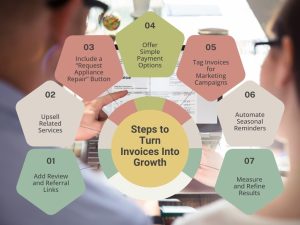
- Add Review and Referral Links
Include links on every invoice so customers can leave reviews or refer friends. Connect these to your appliance repair CRM to track activity and reward referrals. - Upsell Related Services
Turn invoices into sales tools by adding related services. For example, upsell dryer vent cleaning after a washer repair to increase revenue per job. - Include a “Request Appliance Repair” Button
Pair your invoicing software with scheduling tools. Adding a booking button on invoices makes it easy for customers to request their next repair without leaving your system. - Offer Simple Payment Options
Use mobile payment links so customers pay on the spot. Integrate with QuickBooks Online and accounting software to keep billing accurate and improve cash flow. - Tag Invoices for Marketing Campaigns
Label invoices with campaign names like “Holiday Oven Check.” Track which campaigns bring in the most appliance repair revenue and adjust marketing efforts accordingly. - Automate Seasonal Reminders
Use invoicing and dispatch software to track seasonal repair trends. Send timely reminders for tune-ups or maintenance to keep service calls coming in year-round. - Measure and Refine Results
Review reporting tools in your invoicing system. Track how many reviews, referrals, and new jobs come from invoices. Use this data to lower appliance repair lead costs and grow your business.
Building Customer Trust Through Professional and Transparent Invoices
Branded invoices that reinforce credibility
Professional appliance repair invoices show customers that your appliance repair shop is reliable. Appliance repair business software helps you create invoices with your logo, service details, and terms.
Offering mobile and online payment options
Appliance repair invoice software often includes mobile app payment links. Giving customers the option to pay online makes billing simple and professional.
Clear pricing breakdowns that build transparency
Customers value transparency. A detailed invoice created with appliance repair business management software removes confusion and builds loyalty.
Must-Have Features in Appliance Repair Invoicing Software
Mobile-friendly design for technicians in the field
Appliance repair software for business should always include a mobile app so appliance techs can create invoices anywhere.
Integration with dispatch and scheduling software
Appliance repair dispatch software and appliance repair scheduling software are key. Look for a solution that lets you schedule and dispatch jobs directly from the same system you use to generate invoices.
Automated reminders and follow-ups
The best appliance repair business software sends reminders for overdue invoices and future maintenance work. This helps business owners optimize time management and customer relationship management.
Reporting tools that connect operations with marketing
Management software has different plans, but the best appliance repair software always includes reporting. These reports help you measure how invoices tie into business growth.
Actionable Steps to Successfully Implement Invoicing Software
1. Define Goals and KPIs
The first step is to define clear goals for your appliance repair invoicing software rollout. Decide what you want to achieve, whether it’s reducing time-to-payment, improving invoice accuracy, increasing upsell revenue, or driving more repeat jobs. For example, you might aim to shorten the average payment cycle from ten days to three or raise invoice accuracy to 95 percent. By setting measurable KPIs, you create benchmarks that help you track progress and understand how your invoicing software impacts your overall appliance repair lead costs. A simple reporting dashboard inside the software keeps these numbers visible every day.
2. Start a Pilot Program
Instead of rolling out the system across your entire appliance repair business, start with a pilot program. Select one technician or a small team and run the pilot for two to four weeks. This smaller scope allows you to test how the workflow functions from work order to invoice to payment. It also highlights any bottlenecks or training needs before you scale to the full team. A controlled rollout reduces risk, ensures adoption, and provides real-world data on how appliance repair invoicing software performs in your business environment.
3. Configure Templates and Payments
Your appliance repair invoicing software should be set up for professional and seamless customer interactions. Configure branded invoice templates with your logo, tax rules, and price books so invoices look consistent and accurate. Enable card and ACH payment links through the mobile app to give customers easy payment options. If you use QuickBooks Online or another accounting system, connect it to your invoicing software and test that payments sync correctly both ways. Proper setup ensures smooth billing, faster payments, and better management of appliance repair lead costs.
4. Link Scheduling, Dispatch, and Work Orders
For maximum efficiency, connect your scheduling and dispatch systems with your appliance repair invoicing software. When these tools are linked, jobs automatically flow from scheduling into invoices without extra manual work. A technician can complete a repair, generate the invoice, and collect payment directly from the field. Every work order, invoice, and payment is tracked in one place. This integration saves time, reduces errors, and streamlines your appliance repair service so you spend less money per lead and increase the overall ROI from your marketing efforts.
5. Train Your Team on Customer-Facing Steps
Training is critical. Even the best software falls short if your team isn’t confident using it. Show your technicians how to create invoices from the field, how to add a “Request Appliance Repair” button, and how to insert review and referral links. Teach them to upsell related services directly from the invoice, such as offering dryer vent cleaning after completing a washer repair. When technicians know exactly how to handle invoices with customers, those invoices become more than billing tools—they become part of your marketing and sales system, helping you control appliance repair lead costs while driving more service calls.
6. Automate Reminders and Follow-Ups
Once your invoices are set up, use your appliance repair invoicing software to automate reminders and follow-ups. This includes overdue payment reminders to improve collections, seasonal maintenance reminders to generate repeat jobs, and thank-you emails that include referral links. Tagging invoices with specific campaign names such as “Holiday Oven Check” lets you track which campaigns bring in the most appliance repair revenue. Automating these processes not only saves time but also turns invoices into ongoing marketing tools that keep appliance repair lead costs manageable.
7. Track, Review, and Scale
The final step is to track your results and decide when to scale. Use the reporting tools inside your appliance repair invoicing software to review key outcomes like time-to-payment, collection rate, upsell revenue, and the number of reviews generated. Look for gaps or weak points, fix them during the pilot stage, and then expand the system to additional technicians or your entire company. By measuring results and refining your workflow, you create a cycle where invoicing supports marketing, improves ROI, and lowers appliance repair lead costs over time.
Just Done Appliance Installations, Edmonton, AB
This appliance business mastered appliance repair invoicing software by adopting Jobber in 2018 to link scheduling, CRM, quotes, and invoicing in one workflow. Reported results include saving 15 to 20 office hours each week and improving quote wins from about 4 out of 10 to 6 out of 10, strong proof that appliance repair invoicing software drives both efficiency and sales.
How they use appliance repair invoicing software:
- Professional online estimates flow into appliance repair invoices when jobs finish, so billing stays on track and cash flow improves.
- Job details, photos, timestamps, and client records live in one place, which speeds customer responses and reduces admin for the team.
- Scheduling and CRM tools sit beside invoicing, so the office assigns work faster and techs stay focused on the install, not paperwork.
AMP Up Your Growth with Smarter Invoicing
Appliance repair invoicing software is more than a billing tool. It’s business management software designed to help appliance repair companies streamline operations, improve cash flow, and generate leads. When combined with scheduling, dispatch, CRM, and inventory management, it becomes an all-in-one software solution built for appliance repair.
Running an appliance repair business is easier when every part of your operation works in one platform. From job scheduling and work orders to appliance repair invoices and customer management, software designed with appliance repair in mind helps business owners run their business with confidence.
About The Author


