
Blog
Is Your Website Actually Generating Calls? How Call Tracking Proves It
You spent money on your website. It looks clean. It loads fast. But you still have no idea if it’s bringing in jobs or just sitting there like a billboard in the desert.
That’s the problem most appliance repair owners face. You know your phone rings, but you don’t know why. Did they find you on Google? Was it your Google Business Profile? Did they click an ad? Or did they just remember your truck from two years ago?
Without call tracking, you’re guessing. And guessing costs money.
This guide walks you through exactly how to track calls from your website so you know what’s working, what’s not, and where to spend your next dollar.
Why Most Appliance Repair Owners Can’t Track Website Calls
The average appliance repair business gets calls from several places. Your Google Business Profile, your website, Google Ads, Local Services Ads, referrals, and repeat customers. But if you only have one phone number listed everywhere, every call looks the same.
You can’t tell which marketing channel brought the lead. You can’t calculate cost per lead. You can’t optimize what you can’t measure.
Here’s what happens without call tracking. You spend $800 on Google Ads and $400 on SEO. You get 30 calls that month. You book 18 jobs. But you have no idea which 18 came from which source. So you keep spending on both, even if one is doing all the work and the other is wasting your budget.
Call tracking fixes that.
What Call Tracking Actually Does
Call tracking gives you a different phone number for each marketing channel. One number for your website. One for your Google Ads. One for your Google Business Profile if you want. When someone calls, the system logs where they came from, what page they were on, and how long the call lasted.
You still answer the same phone. The customer doesn’t notice anything different. But on the backend, you see exactly which marketing effort generated the call.
The best systems also record the call so you can listen later. That’s huge for training your team, catching missed opportunities, and understanding why some leads book and others don’t.
The Two Main Types of Call Tracking
There are two ways to track calls from your website.
Static Number Insertion gives each traffic source its own dedicated number. You manually place different numbers on different pages or campaigns. For example, your Google Ads landing page shows one number, and your organic homepage shows another.
This works well for small setups. It’s simple and cheap. But if you have multiple campaigns or traffic sources, managing dozens of numbers gets messy fast.
Dynamic Number Insertion (DNI) automatically swaps the phone number on your website based on where the visitor came from. If they clicked a Google Ad, they see one number. If they came from organic search, they see a different one. If they came from Facebook, another number.
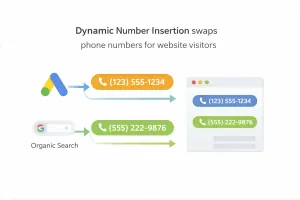
DNI is more powerful because it tracks every source without you having to manually update anything. It’s what most serious appliance repair companies use once they start running multiple campaigns.
What You Actually Need in a Call Tracking System
Not all call tracking tools are built the same. Some are designed for real estate agents. Some are built for e-commerce. You need one that works for service businesses.
Here’s what matters.
Dynamic Number Insertion. This lets you track every traffic source automatically without managing a dozen phone numbers yourself.
Call recording. You need to hear what your dispatcher or CSR actually said. Most appliance repair owners are shocked when they listen to their first batch of calls. Half the time, the lead was great but the phone handling was weak.
Spam filtering. Robo-calls and telemarketers will eat up your data if you don’t filter them out. Good systems flag or block spam so your reports stay clean.
Integration with Google Analytics and your CRM. If your call tracking system doesn’t talk to your analytics or scheduling software, you’re still working with incomplete data.
Local number options. Customers trust local numbers more than toll-free 800 numbers. Make sure your system can generate numbers with your area code.
How to Set Up Call Tracking on Your Website

Most call tracking platforms walk you through setup, but here’s the basic process.
First, you sign up for a call tracking service. Popular options for home service businesses include CallRail, CallTrackingMetrics, and WhatConverts. These platforms are built for companies like yours.
Next, you get a tracking number. If you’re using DNI, you’ll get a pool of numbers that rotate based on traffic source. If you’re using static tracking, you’ll assign one number per channel.
Then you add a small piece of code to your website. This is usually a JavaScript snippet that goes in your site’s header. If you’re on WordPress, most call tracking platforms have plugins that make this even easier. If you’re not technical, your web developer or marketing agency can handle this in under 10 minutes.
Once the code is live, the system starts swapping numbers dynamically. A visitor from Google Ads sees one number. A visitor from organic search sees another. The customer has no idea. They just see a local number and call it.
Finally, you connect the system to Google Analytics so call data flows into your reporting dashboard. Now when you look at your analytics, you see which pages, campaigns, and keywords are generating actual phone calls, not just clicks.
Does Call Tracking Hurt Your Local SEO?
This is the question every appliance repair owner asks, and it’s a smart one. You’ve worked hard to build NAP consistency (Name, Address, Phone Number) across your Google Business Profile, your website, and your citations. You don’t want to mess that up.
Here’s the truth. Modern call tracking systems do not hurt your SEO when set up correctly.
The key is how the tracking number is displayed. Good DNI systems show the tracking number to human visitors but keep your real NAP-consistent number visible to search engine bots. Google’s crawler sees your actual business number. Real people see the tracking number.
This is done through the JavaScript code. Bots don’t execute JavaScript the same way browsers do, so they see the hardcoded number in your HTML. Humans see the dynamically inserted tracking number.
Your citations, your Google Business Profile, and your website footer should all still list your real business number. The tracking number only appears to live visitors during their session.
If your call tracking provider doesn’t support this setup, find a different provider. It’s a standard feature in 2026.
What to Do With Call Tracking Data

Having the data is one thing. Using it is another.
Most appliance repair owners set up call tracking and then never look at the dashboard. That’s like buying a truck and leaving it parked in the driveway.
Here’s how to actually use the data.
Review your call sources weekly. Look at which campaigns, pages, or keywords are generating the most calls. If Google Ads is bringing in 20 calls a week and SEO is bringing in 3, you know where your money is working.
Listen to your call recordings. Pick 5 to 10 calls a week and listen to how your team handles them. Are they friendly? Do they ask the right questions? Do they try to book the job, or do they just give a price and hang up?
Most appliance repair companies lose more revenue from bad call handling than from bad marketing. Call recordings let you fix that.
Calculate cost per booked job by source. Don’t just count calls. Count how many turned into actual jobs. If Google Ads costs you $50 per call but only 30% book, your real cost per job is $166. If SEO costs you $15 per call and 60% book, your real cost is $25. That changes how you allocate budget.
Identify your best-performing pages. If your refrigerator repair page generates 40% of your calls, that tells you to create more content like it. If your homepage gets traffic but no calls, something’s broken.
Spot patterns in call timing. If most of your calls come between 8 a.m. and 11 a.m., make sure someone’s answering the phone during that window. If you’re getting calls at 9 p.m. but no one picks up, you’re losing jobs.
Common Mistakes Appliance Repair Companies Make With Call Tracking
Even when you have the system in place, there are ways to screw it up.
Not filtering spam calls. If you don’t filter out robo-calls and telemarketers, your data will be useless. A campaign that looks like it generated 15 calls might have only generated 8 real ones.
Forgetting to train your team. If your dispatcher doesn’t know the number is being tracked and recorded, they might give inconsistent answers or sound unprofessional. Let your team know calls are recorded for quality and training.
Only tracking calls, not form submissions. Some customers prefer to fill out a contact form instead of calling. If you’re only tracking phone calls, you’re missing part of the picture. Use form tracking tools like Google Analytics goals or your CRM to capture those leads too.
Not connecting tracking data to your CRM. If your call tracking system doesn’t talk to your scheduling software, you still don’t know which calls turned into booked jobs. Integration is key.
Setting it up and ignoring it. Call tracking only works if you review the data and make changes based on what you learn. Set a weekly or monthly time to check your dashboard and adjust your strategy.
How AMPRank Uses Call Tracking to Drive Revenue
At Appliance Marketing Pros, call tracking isn’t optional. It’s built into every AMPRank plan because we can’t optimize what we can’t measure.
We set up dynamic number insertion on your website, connect it to Google Analytics, and integrate it with your CRM if you have one. Then we monitor the data weekly. We look at which campaigns are driving calls, which pages are converting, and where leads are falling through the cracks.
But we go further than most agencies. We also review call recordings with you. We listen for patterns. Are leads asking about pricing before booking? Are they confused about your service area? Are they calling competitors after they call you?
We use that insight to improve your website copy, your ad messaging, and your dispatcher scripts. Most appliance repair companies are sitting on a gold mine of conversion data and don’t even know it.
We also filter out spam automatically so your reports stay clean. You only see real leads. And we calculate cost per booked job by source so you know exactly where your marketing dollars are working hardest.
Final Thoughts
Your website should be a lead-generating machine, not a digital business card. But if you’re not tracking calls, you have no idea if it’s working.
Call tracking gives you clarity. It shows you which traffic sources are worth investing in, which pages need work, and how well your team is converting leads. It turns guessing into strategy.
If you want consistent, predictable call volume, start tracking your calls this week. If you’d rather have an expert handle the setup and analysis for you, reach out to Appliance Marketing Pros. We’ll audit your current system, show you what’s missing, and build a plan to grow your appliance repair business with real data behind every decision.
Ready to stop guessing and start growing? Schedule a Strategy Call with Appliance Marketing Pros today.