

Table of Contents
Google Local Services Ads Disputes: How to Stop Paying for Wrong Numbers
You’re paying $25, $40, sometimes $50 per lead through Google Local Services Ads. But when you listen back to the calls, half of them are people asking whether you fix commercial equipment, whether you only sell parts, or whether you’re in two counties over.
Google charged you anyway.
If you’re not disputing those leads, you’re throwing money away. And if you are disputing them but getting denied, you’re doing it wrong.
This guide walks you through exactly how to stop paying for wrong numbers, what actually qualifies for a refund, and how to set up your LSA profile so you stop attracting the wrong calls in the first place.
Why LSA Disputes Matter More Than You Think
Most appliance repair owners we work with don’t realize how much they’re losing to bad leads until we audit their accounts.
We’ve seen shops pay $1,200 in a single month for leads that had zero chance of converting. Wrong service area. Wrong equipment type. Existing customers are calling about warranties. People who hung up before anyone answered.
Google doesn’t refund those automatically. You have to ask. And you have to ask the right way.
The difference between a business that disputes leads and one that doesn’t is often $300 to $800 per month in recovered budget. That’s real money that could go toward another truck, better pay for your techs, or just staying in your pocket.
What Changed with Google’s LSA Dispute System
Google used to let you manually dispute almost any lead. You’d select a reason, add notes, and wait for a decision.
That system is mostly gone now.
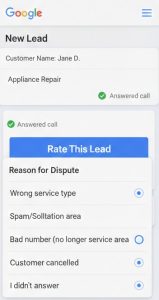
In mid-2024, Google shifted to an automated credit system and replaced the dispute button with a feedback tool called Rate This Lead. The goal was to reduce manual work and let algorithms decide which requests qualify for a refund.
Here’s what that means for you:
- Some bad leads get credited automatically if Google’s system flags them as spam or duplicates
- Other bad leads require you to submit feedback through Rate This Lead
- Certain categories that used to qualify for refunds no longer do
The biggest loss? You can no longer get automatic credits for leads that are the wrong job type or outside your service area.
If someone calls asking about commercial ice machines and you only do residential appliances, Google used to refund that lead. Now they don’t. Their position is that you should have configured your profile correctly in the first place.
That makes profile accuracy more important than ever. But it also means you need to know which disputes are still worth fighting.
What You Can Still Dispute and Get Refunded
Google will still issue credits for specific types of bad leads. These are the categories that actually work:
Spam or fraudulent calls. Robocalls, silent calls, or obvious scam attempts. If the recording is just dead air or a bot, flag it. Google’s automated system usually catches these, but not always.
Duplicate leads. If the same person calls you twice and you get charged twice, that qualifies. Make sure you note the previous lead ID in your feedback.
Existing customer calls. This is huge for appliance repair. If someone calls about a unit you’ve already serviced, or they’re an existing client with a warranty issue, that’s not a new lead. Google will credit it if you can prove it.
Caller not ready to book. If the person is just shopping around or gathering quotes with no intent to move forward, you can dispute it. But you need the call recording to back it up.
Employment or sales pitch. If someone calls trying to sell you something or asking for a job, that’s not a lead. These usually get approved quickly.
Wrong business information. If the lead was routed to you by mistake because of incorrect profile data, dispute it. This happens more often than it should.
Each of these categories still qualifies for a refund, but only if you submit feedback correctly and provide enough detail for Google to verify.
What Google Will Not Refund Anymore
These are the disputes that used to work but don’t anymore:
Job type not serviced. If you only fix refrigerators and someone calls asking about a dishwasher, Google won’t refund it. Their expectation is that your profile should only list the appliances you actually service.
Location outside your service area. If someone calls from a town you don’t cover, you’re out of luck unless you can prove your service area settings were wrong. Google assumes your map is accurate.
This is a major shift. It moves all the responsibility onto you to configure your profile perfectly. If you list “appliance repair” as a broad category, Google will send you calls for everything under the sun. If you don’t service dryers, you better make sure dryers aren’t listed.
The only exception is if Google’s system glitches and routes a lead incorrectly despite your settings being right. But proving that is hard.
How to Use the Rate This Lead System
Here’s the step-by-step process for disputing a bad lead under the new system.
Step 1: Log into your Local Services Ads dashboard. You can do this from a desktop or the Google Local Services app. A desktop is easier for detailed notes.
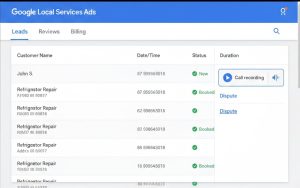
Step 2: Go to your Leads tab. This shows every lead you’ve been charged for, along with the call recording or message thread.
Step 3: Find the lead you want to dispute. Click it to see the full details.
Step 4: Listen to the call recording. This is critical. Don’t guess. Listen to exactly what the caller said and when. Note timestamps if possible.
Step 5: Click Rate This Lead. You’ll see a satisfaction scale. Select “Very Dissatisfied” if the lead was completely worthless, or “Somewhat Dissatisfied” if it was borderline.
Step 6: Choose the reason from the dropdown. Pick the category that matches closest. If it’s an existing customer, choose that. If it’s spam, choose that. Don’t pick the wrong category just because it sounds better.
Step 7: Add detailed notes. This is where most people fail. Don’t just write “bad lead.” Write something like: “Caller asked at 0:32 if we service commercial freezers. We only service residential appliances. This is outside our listed service categories.”
The more specific you are, the better your chances. Quote the caller if you can. Reference timestamps. Explain why it doesn’t fit your business.
Step 8: Submit and wait. Google typically reviews feedback within a few days. If approved, the credit shows up in your account within 30 days.
Common Mistakes That Get Disputes Denied
We see the same mistakes over and over when reviewing client accounts. Here’s what kills your chances of getting a refund:
Waiting too long. You have 30 days to dispute a lead. After that, it’s gone. Set a weekly reminder to review your leads and submit feedback on anything questionable.
Choosing the wrong dispute reason. If you mark a lead as spam when it’s actually just outside your service area, Google will deny it. Be accurate.
Leaving vague notes. “Customer wasn’t interested” doesn’t tell Google anything. “Customer stated at 1:15 that they only need a replacement part; we do not sell parts” is much stronger.
Not listening to the recording first. If you dispute a lead and the recording shows the caller was clearly ready to book, you’ll lose credibility for future disputes. Only disputes that are genuinely bad.
Disputing leads that don’t qualify. If the call was legitimate but the customer just didn’t hire you, that’s not a bad lead. That’s a sales issue. Don’t waste your time disputing it.
The goal is to be strategic. Dispute the leads that clearly don’t fit. Let the borderline ones go. Build a track record of accurate feedback so Google takes you seriously.
How to Prevent Bad Leads in the First Place
Disputing leads is damage control. The real fix is setting up your profile so you stop attracting the wrong calls.
Here’s what actually works:
Only list the appliance types you service. If you don’t fix washers, don’t list washer repair. If you only service certain brands, specify that in your business description. Google uses this information to match leads.
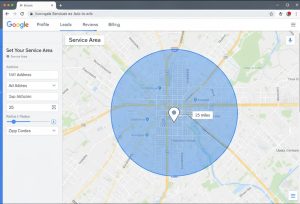
Set your service area precisely. Use the map tool to draw your exact coverage area. Don’t just pick a radius and hope for the best. If you don’t serve a certain zip code, exclude it.
Update your business description with specifics. Instead of “appliance repair,” write “residential refrigerator and oven repair for GE, Whirlpool, and Samsung in [your city].” This filters out commercial calls and brand-specific requests you can’t handle.
Turn off lead types you can’t serve. If you don’t do same-day service or 24-hour emergency calls, make sure those aren’t enabled as lead options. Every setting matters.
Check your profile weekly. Google sometimes resets settings or adds new categories without telling you. Log in once a week and verify everything is still accurate.
The better your profile matches your actual business, the fewer disputes you’ll have to file. This also improves your overall lead quality, leading to better conversion rates and a lower cost per booked job.
Real Scenarios: What to Dispute and What to Let Go
These are examples pulled from actual client accounts. Names and details are changed, but the situations are real.
Scenario 1: Caller asks if you service commercial refrigeration.
You only do residential. This used to qualify for a refund. Now it doesn’t, unless you can prove your profile clearly states residential only and Google still sent the lead. If your profile just says “refrigerator repair” without specifying residential, you’re probably stuck with the charge.
Scenario 2: Caller is an existing customer seeking assistance with a warranty issue.
This qualifies. Note the original service date in your feedback. If you have a job number or invoice, include that. Google will credit it.
Scenario 3: Caller from a town 40 miles outside your service area.
This no longer qualifies unless your service area map was set wrong. If your map is accurate and the caller is outside it, Google should have blocked the lead. But if the caller is barely outside and your radius is borderline, you’ll probably lose the dispute.
Scenario 4: Silent call or obvious robocall.
Dispute it. These are usually credited automatically, but if they aren’t, submit feedback. This is one of the clearest categories.
Scenario 5: Caller only wants to buy a replacement part.
If you don’t sell parts, this is borderline. It depends on how your profile is set up. If your description mentions only installation or repair, you have a case. If it’s vague, Google might deny it.
Scenario 6: Caller cancels the appointment before you arrive.
Not disputable. The lead was valid when they booked. What happens after that is on you to manage.
How We Handle LSA Disputes for Clients
When we manage Local Services Ads for appliance repair shops, we review every lead within 48 hours.
We listen to the recordings. We flag anything that doesn’t fit the client’s business model. We submit detailed feedback with timestamps and context. And we track the results so we can adjust the profile settings if we see patterns.
Most clients recover between $200 and $600 per month in bad lead credits once we start doing this consistently. That’s money they were losing before because no one was paying attention.
But the bigger value is in prevention. We configure profiles with surgical precision. If a client only services five-mile radius around their shop, that’s exactly what we set. If they don’t fix built-in ovens, we remove that category. If they only take certain brands, we write that into the description.
The result is fewer bad leads, better conversion rates, and lower cost per job. Disputes become rare because the leads are already better quality.
That’s the real goal. You shouldn’t have to dispute 20 leads a month. You should have to dispute two or three at most.
What to Do If Your Disputes Keep Getting Denied
If you’re submitting feedback and nothing is getting approved, something is wrong.
Here are the most common causes:
You’re picking the wrong dispute category. Go back and re-read the category definitions. Make sure what you’re selecting actually matches the lead.
Your notes aren’t specific enough. Add more detail. Quote the caller. Reference the recording. Explain exactly why it doesn’t fit your business.
Your profile settings don’t support your dispute. If you’re disputing job type leads but your profile lists that job type, Google will deny it every time. Fix your profile first, then dispute future leads.
You’re disputing too many leads. If you’re flagging 40% of your leads as bad, Google starts to assume the problem is with your business, not the leads. Be selective.
If you’ve tried all of that and you’re still getting denials, it might be time to bring in someone who does this full-time. We’ve handled hundreds of disputes and we know exactly what Google looks for in the review process.
When LSA Disputes Are a Symptom of a Bigger Problem
If you’re consistently disputing more than 10% of your leads, the problem isn’t the dispute system. The problem is your profile setup, your market, or your ad strategy.
Here’s what we usually find when a client is drowning in bad leads:
Their service area is too broad. They set a 30-mile radius hoping for more volume, but they’re getting calls from towns they’d never actually drive to.
Their profile is too vague. It says “appliance repair” without specifying whether it’s residential or commercial, the brands, or the equipment types. Google sends everything.
They’re in a competitive market with low-quality lead sources. Sometimes the issue isn’t your profile. It’s that LSA in your city is flooded with competitors and Google is scraping the bottom of the barrel to find leads.
Their phone system isn’t set up correctly. If you’re missing calls or calls are going to voicemail, Google might count those as completed leads even though you never spoke to the person. That’s a tracking issue, not a lead quality issue.
We’ve also seen cases where the business model just doesn’t fit LSA well. If you only do high-end built-in appliance repair and your average job is $800, LSA might send too many low-budget leads to make the math work.
In those cases, we shift budget to Google Ads Search campaigns or local SEO instead. LSA is a great tool, but it’s not the right fit for every appliance repair business.
The Bottom Line on Google Local Services Ads Disputes
Here’s what you need to remember:
Google will still refund bad leads, but only for specific reasons. Spam, duplicates, existing customers, and non-buyers qualify. Wrong job type and wrong location usually don’t anymore.
You have 30 days to dispute. After that, the money is gone.
The Rate This Lead system requires detailed notes and accurate categorization. Don’t rush it.
The best strategy is prevention. Fix your profile so you stop attracting bad leads in the first place.
If you’re spending more than an hour a week managing disputes, something is broken. Either your profile needs work or your market isn’t a good fit for LSA.
Most appliance repair shops should be able to recover $200 to $500 per month in bad lead credits with consistent effort. If you’re not doing that, you’re leaving money on the table.
Stop Losing Money on Bad Leads
If you’re tired of paying for calls that go nowhere, we can help.
At Appliance Marketing Pros, we specialize in Google Local Services Ads for appliance repair companies. We handle everything from profile setup to lead review to monthly dispute management. Our clients see fewer bad leads, better conversion rates, and clearer ROI.
We also know when LSA isn’t the answer. If your market or business model doesn’t fit, we’ll tell you that upfront and build a strategy around Google Ads Search or local SEO instead.
Book a free strategy call and we’ll audit your current LSA setup. We’ll show you exactly where you’re losing money, which disputes you should be winning, and what changes will make the biggest difference.
No fluff. No long-term contracts. Just a clear plan to stop wasting money on wrong numbers and start getting calls that actually turn into jobs.
About The Author


