
Table of Contents
The Essential Negative Keyword List Every Appliance Repair Business Needs
If you’re running Google Ads for your appliance repair business and wondering why your phone isn’t ringing with actual paying customers, there’s a good chance you’re bleeding money on the wrong clicks.
You’re not alone. Most appliance repair owners we talk to are paying $10, $15, sometimes $20 per click for searches that were never going to turn into service calls. Someone looking for a YouTube video on how to replace a dryer belt. Someone hunting for a $12 part on Amazon. Someone applying for a job.
Every one of those clicks costs you money. And none of them book appointments.
That’s where negative keywords come in. They’re the filter that tells Google when not to show your ad. And if you’re not using them, you’re essentially handing your marketing budget to people who have zero intention of hiring you.
This guide will walk you through exactly what negative keywords are, why they matter for appliance repair businesses specifically, and give you a ready-to-use list you can add to your campaigns today.
What Are Negative Keywords and Why Do They Matter?
A negative keyword is a word or phrase you add to your Google Ads campaign that prevents your ad from showing when someone searches for it.
Think of it like this. You bid on the keyword “refrigerator repair.” That’s smart. But without negative keywords, your ad might also show for:
- “how to repair a refrigerator”
- “refrigerator repair manual PDF”
- “refrigerator repair jobs near me”
- “cheap refrigerator parts”
None of those people are looking for a repair technician. They’re looking for information, parts, or employment. But Google sees “refrigerator repair” in their search results and still shows your ad.
You pay for the click. They bounce. You get nothing.
For appliance repair companies, this problem is worse than most industries because there’s a massive overlap between commercial intent (I need a pro to fix this) and informational intent (I want to try fixing it myself).
Your job is to separate the two. Negative keywords do that.
How Negative Keywords Improve Your Google Ads Performance
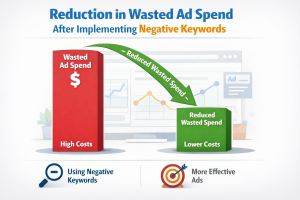
When you add negative keywords to your campaigns, three things happen almost immediately.
You stop wasting money on junk clicks. Every click costs you. If 30% of your clicks are from DIYers, job seekers, or parts hunters, you’re throwing away 30% of your budget. Negative keywords cut that waste.
Your click-through rate goes up. When your ad only shows to people who actually need a repair service, more of them click. Google sees that as a signal that your ad is relevant, which improves your Quality Score.
Your cost per click goes down. A higher quality score means lower cost per click. You’re paying less for better traffic. That’s the entire point of running ads in the first place.
We’ve seen appliance repair clients cut their cost per lead by 40% or more just by cleaning up their negative keyword lists. No new ad copy. No landing page changes. Just smarter filtering.
The Three Types of Negative Keyword Match Types
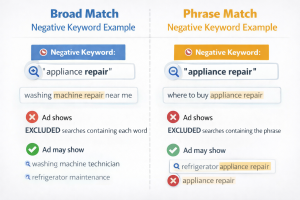
Negative keywords work differently from regular keywords. There are three match types, and understanding them matters.
Broad Match Negative blocks your ad if the search contains that word in any order. If you add “free” as a broad match negative, your ad won’t show for “free refrigerator repair” or “refrigerator repair free estimate.”
Use this for universal blockers like “free,” “DIY,” or “jobs.”
Phrase Match Negative blocks your ad only if the search contains that exact phrase in that order. If you add “how to” as a phrase match negative, your ad won’t show for “how to fix a dryer” but it will still show for “dryer fix how much.”
Use this for concept-level exclusions, such as “how to fix” or “repair manual.”
Exact Match Negative blocks your ad only for that specific search term with nothing added. If you add [washer repair] as an exact match negative, your ad won’t show for “washer repair” but it will show for “washer repair near me.”
This is rarely useful. Stick with broad and phrase match for most of your list.
For appliance repair, we recommend starting with phrase match for most negatives. It gives you control without over-blocking legitimate searches.
The Universal Negative Keywords Every Appliance Repair Business Should Use
These are the foundational negatives that apply to almost every appliance repair company. Add these to your account at the campaign level so they apply everywhere.
Job Seekers and Employment
- job
- jobs
- career
- careers
- hiring
- employment
- salary
- wages
- apply
- application
- resume
- apprentice
- training
- technician school
- certification course
You’re looking for customers, not employees. Block these immediately.
- DIY
- how to
- how do I
- how can I
- tutorial
- guide
- step by step
- fix it yourself
- repair yourself
- do it myself
- youtube
- video tutorial
People searching for these terms want to fix the problem themselves. They’re not hiring you.
Parts and Product Searches
- parts
- part
- buy parts
- order parts
- replacement parts
- appliance parts
- OEM parts
- aftermarket
- Amazon
- eBay
- Home Depot
- Lowes
- Sears parts
If someone is shopping for parts, they’re either fixing it themselves or they’ve already hired someone else. Either way, not your customer.
Bargain Hunters and Freebie Seekers
- free
- cheap
- cheapest
- lowest price
- discount
- coupon
- deal
- promo code
You’re a professional service business. You don’t compete on being the cheapest. Block searches from people hunting for the absolute lowest price.
Educational and Informational Searches
- course
- class
- school
- certification
- definition
- what is
- meaning
- blog
- article
- forum
These are research queries. Not service calls.
Appliance Repair-Specific Negative Keywords You Can’t Ignore
This is where most general marketing advice falls short. Appliance repair has unique challenges that require a more tailored negative keyword strategy.
Small Appliance Exclusions
If you only service major appliances, you need to block searches for small appliances. These clicks add up fast.
- vacuum
- vacuum repair
- Dyson
- Shark vacuum
- Roomba
- coffee maker
- Keurig
- blender
- toaster
- air fryer
- microwave (if you don’t service microwaves)
- food processor
- mixer
- instant pot
Someone searching for “vacuum repair near me” is not going to book a refrigerator repair. Don’t pay for that click.
Brand Exclusions for Appliances You Don’t Service
If you don’t work on certain brands, add them as negatives. This is especially important for high-end or commercial brands.
- Wolf (if you don’t service Wolf)
- Sub-Zero (if you don’t service Sub-Zero)
- Viking
- Thermador
- Miele
- Bosch (if residential only)
- commercial refrigerator
- industrial oven
- restaurant equipment
If you get a call for a brand you can’t service, you’ve wasted money and disappointed a potential customer. Block it upfront.
Service Type Mismatches
If you only do repair, not installation or parts sales, make that clear.
- installation
- install
- new appliance
- appliance sale
- buy appliance
- delivery
- haul away
- removal only
You want repair calls. Not installation quotes.
Warranty and Manufacturer Searches
- warranty
- under warranty
- manufacturer warranty
- factory warranty
- recall
- class action
If the appliance is under warranty, the customer should be calling the manufacturer, not you. These searches rarely convert.
Rental and Commercial Property Terms (If You’re Residential Only)
- apartment complex
- multi-family
- property management
- landlord special
- rental property
- HOA
- condo association
Commercial or bulk service calls are a different business model. If you’re set up for residential service calls, block these.
How to Add Negative Keywords to Your Google Ads Account
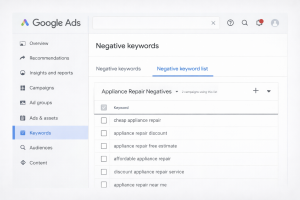
If you’ve never added negative keywords before, here’s the step-by-step.
Log into your Google Ads account. Go to the left-hand menu and click on “Keywords.” Then click on “Negative Keywords” at the top.
You’ll see two options: add negative keywords to a specific campaign or create a negative keyword list that applies across multiple campaigns.
For universal negatives like “jobs” or “DIY,” create a negative keyword list and apply it to all your campaigns. This keeps things clean and makes updates easier.
For campaign-specific negatives like brand exclusions, add them directly to the individual campaign. For example, if you have a campaign targeting “refrigerator repair” but you don’t service Sub-Zero, add “Sub-Zero” as a negative in that campaign only.
When you add the keyword, choose phrase match for most terms. Type the keyword, select “Phrase match,” and save.
That’s it. Your ads will stop showing for those searches immediately.
The Search Terms Report: Your Best Tool for Finding New Negatives
The most valuable part of your Google Ads account is the Search Terms Report. This shows you the exact phrases people typed before clicking your ad.
To find it, go to “Keywords” in the left menu, then click “Search terms” at the top.
Look through the list. You’ll see searches that triggered your ads. Some will be perfect. Others will make you wonder what Google was thinking.
Any search that clearly isn’t a potential customer should be added as a negative keyword. Look for patterns:
- Repeated “how to” searches
- Searches with brand names you don’t service
- Searches for parts or products
- Searches for jobs or training
Check this report at least once a week when you first launch a campaign. After the first month, review it monthly. You’ll always find new negatives to add.
Common Mistakes to Avoid with Negative Keywords
Don’t over-block. Some business owners get aggressive and start blocking terms like “cost” or “price” because they think it filters out tire-kickers. Bad idea. People who want to know the cost are still potential customers. They’re just doing research. Block intent mismatches, not normal buyer behavior.
Don’t ignore close variants. Google matches your keywords to similar searches, even if they’re not exact. The same applies to negatives. If you block “repair manual,” you’re also blocking “manual for repair” in most cases. But always double-check your search terms report to be sure.
Don’t set it and forget it. Your negative keyword list should grow over time. New junk searches keep popping up. The search terms report is your early warning system. Use it.
Don’t rely on someone else’s list without customization. A generic negative keyword list for home services might block terms that are actually valuable for appliance repair or miss terms specific to your market. Start with a foundation, then refine based on your own data.
What This Means for Your Bottom Line
Let’s say you’re spending $2,000 a month on Google Ads for appliance repair. You’re getting 150 clicks at an average of $13 per click. Out of those 150 clicks, maybe 40 of them are from people looking for jobs, parts, or DIY guides.
That’s $520 a month you’re spending on clicks that will never convert. Over a year, that’s $6,240.
Now imagine cutting that waste in half just by adding a solid negative keyword list. You’re saving $3,120 a year. And because your click-through rate improves, your cost per click drops. Suddenly, you’re getting more qualified traffic for the same budget.
That’s not theory. That’s what happens when you stop paying for the wrong clicks.
Why Most Appliance Repair Businesses Get This Wrong
The problem isn’t that business owners don’t care about wasted spend. It’s that most of them don’t have time to dig into the Google Ads interface every week and analyze search terms.
And most general marketing agencies don’t understand the appliance repair business well enough to know what to block. They’ll add the basics like “free” and “jobs,” but they won’t catch small-appliance searches, brand mismatches, or the DIY patterns specific to this industry.
That’s where specialized experience makes a difference. When you’ve run hundreds of appliance repair campaigns, you know exactly what searches convert and what searches burn budget. You’ve seen the patterns. You know the traps.
Take Control of Your Ad Spend Today
If you’re running Google Ads right now, go check your search terms report. Look at what people are actually typing before they click your ads. You’ll probably find at least a dozen terms you should be blocking.
Add them as negative keywords. Start with the universal list in this guide, then layer in the appliance-specific negatives that match your business.
If you’re not running ads yet, or if you’ve tried them and didn’t see results, negative keywords are one of the biggest reasons campaigns fail. You can have great ad copy, a solid landing page, and a competitive bid. But if you’re showing your ads to the wrong people, none of it matters.
At Appliance Marketing Pros, we build every Google Ads campaign with a custom negative keyword strategy from day one. We know what searches waste money in the appliance repair space because we’ve managed these campaigns for years. We monitor search terms weekly, refine the lists, and ensure every dollar you spend goes toward people who actually need a technician.
If you want to stop guessing and start seeing predictable results from your ad spend, book a free strategy call. We’ll walk you through exactly what’s working in your market and show you where the gaps are. No pressure. No generic pitch. Just straight answers from people who’ve done this hundreds of times.
Your competition is paying for junk clicks right now. You don’t have to.
About The Author


