
Blog
Click Fraud Protection to Detect and Block Competitor Clicks
Click Fraud Protection for Appliance Repair: How to Stop Competitors from Draining Your Google Ads Budget
If you’re running Google Ads for your appliance repair business and your budget disappears by 10 AM without enough calls to show for it, you might be paying for clicks that never turn into customers.
Some of those clicks are accidents. Some are bots. And some of your competitors are deliberately clicking your ads to waste your money.

This is called click fraud, and it’s one of the most overlooked problems in local service advertising. Most appliance repair owners don’t even know it’s happening until they start tracking their data closely.
This guide explains what click fraud is, how it specifically affects appliance repair businesses, and what you can do to protect your ad spend so every dollar works harder.
What Is Click Fraud?
Click fraud happens when someone or something clicks your Google Ads without any intention of hiring you. The click costs you money, but it never had a chance of turning into a service call.
There are three main types:
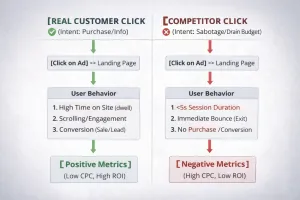
Competitor clicks. Other appliance repair companies in your area click your ads, burning through your daily budget. Once your budget runs out, your ads stop showing and theirs take your place. This is more common than most people think, especially in competitive markets where a few businesses dominate the Google Maps results.
Bot traffic. Automated programs crawl the web and click ads by accident or by design. Bots don’t call your business. They don’t book jobs. They just cost you money.
Accidental clicks. Someone on a phone taps your ad by mistake, backs out immediately, and you still get charged. This happens more on mobile, and while it’s not malicious, it still wastes budget.
The problem is that all three look like real clicks in your Google Ads dashboard. You see the spend. You see the clicks. But you don’t see the jobs.
Why Click Fraud Hurts Appliance Repair Businesses More Than Most
Appliance repair operates in expensive Google Ads territory. If you’re bidding on emergency keywords like “refrigerator repair near me” or “washer not draining,” you’re paying anywhere from $15 to $50 per click depending on your market.
That means four fake clicks can cost you $200. Over a month, that adds up fast.
Here’s what happens when click fraud goes unchecked:
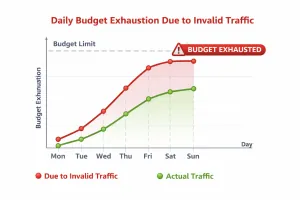
Your daily budget runs out early. If your budget is $100 a day and you get hit with $60 in fake clicks by noon, your ads stop showing during the busiest part of the day. You’re missing real customers who search in the afternoon and evening.
Your cost per lead skyrockets. If half your clicks are fake, your cost per actual lead doubles. You think you’re paying $40 per call, but you’re really paying $80 because half the clicks never had a chance to convert.
Your campaign data gets polluted. Google’s algorithm learns from your clicks. If it sees a bunch of clicks with no conversions, it thinks your ads or landing pages aren’t working. It starts showing your ads to worse audiences or charging you more because it assumes your offer isn’t relevant.
You can’t figure out what’s working. When fake clicks mix with real ones, you can’t tell which keywords, ads, or times of day are actually driving calls. You make decisions based on bad data and your campaigns get worse over time.
In a business where most jobs are booked the same day or within 48 hours, losing even a few hours of ad visibility can mean losing thousands in revenue.
Why Competitors Click Your Ads
Most appliance repair markets are local. You’re competing with the same five to ten companies in your service area. Everyone knows everyone, and the fight for the Google Ads position gets personal.
Here’s why a competitor might click your ads:
To exhaust your budget. If they burn through your daily spend before lunch, their ads show instead of yours for the rest of the day. They get the calls. You don’t.
To study your offers. Some competitors click through to see your landing page, pricing structure, guarantees, and service area. They’re not hiring you. They’re copying you.
To retaliate. If they think you’re clicking their ads, they’ll click yours. It becomes a costly arms race where both businesses lose money.
You can’t prove who’s doing it just by looking at your Google Ads account. IP addresses change. People use mobile devices. Some competitors are smart enough to space out their clicks so they don’t look suspicious.
But if you notice patterns like consistent clicks from the same city at the same time every day with zero conversions, there’s a good chance it’s not random.
Why Google’s Built-In Protections Aren’t Enough
Google automatically filters out some invalid traffic. They refund obvious bot clicks and filter out duplicate clicks from the same user in a short window.
But Google’s system has limits:
It doesn’t catch sophisticated behavior. A competitor who clicks your ad once a day from different devices won’t trigger Google’s filters. The behavior looks normal.
It prioritizes scale. Google’s fraud detection works better for large advertisers spending hundreds of thousands a month. If you’re spending $2,000 a month, you’re not getting the same level of scrutiny.
It doesn’t report transparently. Google won’t tell you how many invalid clicks they filtered or where those invalid clicks came from. You just have to trust the system.
It doesn’t proactively block competitor clicks. Even if you suspect a competitor is clicking your ads, Google won’t let you block them unless you have solid proof. And by the time you gather proof, you’ve already spent the money.
For local service businesses like appliance repair, the margins are too tight to just accept that some fraud is inevitable. You need an extra layer of protection.
How to Detect Click Fraud in Your Appliance Repair Campaigns
If you want to know whether click fraud is costing you money, start tracking a few key patterns in your Google Ads account.
High clicks, low conversions. If a keyword or campaign is getting clicks but zero phone calls or form fills, dig deeper. Check where the clicks are coming from and what time of day they happen.
Clicks from the same IP address or device. Use Google Ads’ built-in reporting to see whether the same IP range appears repeatedly. If you see multiple clicks from the same source with no conversions, that’s a red flag.
Clicks at odd hours. If you’re getting clicks at 2 AM or 3 AM and your business doesn’t offer 24/7 emergency service, those clicks are probably not from real customers.
Sudden spikes in spend with no increase in calls. If your daily spend jumps but your phone isn’t ringing more, something’s wrong. Check your search terms report to see if you’re suddenly getting traffic from irrelevant or suspicious queries.
High bounce rates on specific traffic sources. If people are clicking your ads and leaving your website immediately without taking any action, it could be bots or competitors who have no intention of hiring you.
Most appliance repair owners don’t have time to monitor this daily. That’s where automated click fraud protection comes in.
What Click Fraud Protection Software Does
Click fraud protection tools sit between your Google Ads account and the traffic coming to your website. They monitor every click in real time and decide whether it’s legitimate or fraudulent.
Here’s how they work:
They analyze behavior. The software tracks how someone interacts with your ad and landing page. Real customers scroll, click buttons, and spend time reading. Bots and competitors don’t.
They flag suspicious patterns. If the same device clicks your ad multiple times, or if clicks come from known VPN services or data centers, the software flags it.
They block repeat offenders. Once a device or IP address is identified as fraudulent, the software adds it to an exclusion list so it can’t click your ads again.

They provide reporting. You get a dashboard showing how many fraudulent clicks were blocked, how much money you saved, and where the fraud is coming from.
Some tools even help you file refund requests with Google for invalid clicks that slipped through.
Choosing the Right Click Fraud Protection for Your Business
Not all click fraud protection tools are built the same. Some are designed for enterprise advertisers spending six figures a month. Others are built for small businesses like appliance repair companies.
Here’s what to look for:
Affordable pricing. If you’re spending $2,000 a month on ads, you don’t want to spend $500 a month on fraud protection. Look for tools with pricing that scales with your ad spend.
Easy setup. The best tools integrate directly with your Google Ads account and start working immediately. You shouldn’t need a developer or a technical team to get it running.
Competitor-specific blocking. Since competitor clicks pose a major threat to local service businesses, make sure the tool can identify and block traffic from competitor locations or devices.
Real-time protection. You want clicks blocked as they happen, not flagged for review three days later after you’ve already paid for them.
Clear reporting. You should be able to see exactly how much the tool is saving you. If the software isn’t paying for itself, it’s not worth using.
Some of the most popular tools for small businesses include ClickCease, PPC Protect, and Lunio. Each has different strengths depending on your budget and level of ad spend.
What Happens When You Add Click Fraud Protection
Once click fraud protection is active, you’ll start seeing immediate changes in your campaign performance.
Your cost per lead drops. With fake clicks blocked, more of your budget goes toward real customers. If you were paying $80 per lead before, you might drop to $50 or $60 after fraud protection kicks in.
Your daily budget lasts longer. Instead of running out of budget by noon, your ads stay active through the afternoon and evening when more people are searching for appliance repair.
Your conversion rate improves. Google’s algorithm sees better performance because more clicks result in more calls. Over time, this can lead to better ad placement and lower cost-per-click.
Your data gets cleaner. You can finally trust your reports. When you look at which keywords or ads are driving calls, you’re seeing real performance, not noise from bots and competitors.
You stop funding your competition. If a competitor were burning $500 of your budget every month, that money stays in your pocket. You can reinvest it into more ads or better landing pages, or take it as profit.
Most businesses see ROI within the first month. If the tool saves you $300 and costs you $100, you’re up $200 with no extra effort.
How Appliance Marketing Pros Handles Click Fraud Protection
At Appliance Marketing Pros, click fraud protection is part of how we manage Google Ads for appliance repair businesses. We don’t just set up your campaigns and hope for the best. We actively monitor your traffic, block fraudulent clicks, and make sure your budget is working as hard as possible.
Here’s what that looks like in practice:
We integrate fraud protection software directly into your campaigns so it’s working from day one. We monitor your traffic weekly to catch patterns that automated tools might miss. If we see a competitor burning your budget, we block them and adjust your targeting to avoid overlap.
We also track your cost per lead and cost per job month over month. If we see your numbers improving after adding fraud protection, we document it. If something isn’t working, we adjust.
The goal is simple. Every dollar you spend on Google Ads should have a real chance of turning into a service call. If it doesn’t, we find out why and fix it.
Is Click Fraud Protection Worth It for Small Ad Budgets?
One of the most common questions we hear is whether click fraud protection makes sense if you’re only spending $1,000 or $1,500 a month on Google Ads.
The answer depends on how much fraud you’re dealing with.
If 10 percent of your clicks are fraudulent, that’s $100 to $150 in wasted spend each month. A fraud protection tool that costs $50 to $100 a month pays for itself immediately.
If 20 to 30 percent of your clicks are fake, which is common in competitive appliance repair markets, you could be losing $300 to $450 a month. In that case, fraud protection isn’t optional. It’s one of the highest ROI investments you can make.
Even if your fraud rate is low, the cleaner data alone is worth it. When you know exactly which keywords and ads are driving calls, you can scale your campaigns with confidence instead of guessing.
What to Do Next
If you suspect click fraud is eating into your Google Ads budget, the first step is to review your campaign data. Look for the warning signs we covered earlier: high click volume with low conversion rates, traffic from odd hours, and repeated clicks from the same locations.
If you see any of those patterns, it’s time to add protection.
You can set up a fraud protection tool yourself if you’re comfortable managing your own ads. Most tools offer free trials so you can test them for a few weeks and see if they make a difference.
If you’d rather have someone handle it for you, that’s where we come in. Appliance Marketing Pros specializes in Google Ads for appliance repair businesses. We handle setup, monitoring, optimization, and fraud protection so you can focus on running service calls.
We don’t work with everyone. We only take on businesses that are serious about growth and ready to invest in systems that actually work.
If that sounds like you, schedule a free strategy call. We’ll review your current campaigns, show you where your budget is going, and give you a clear plan for how to fix it.
You can learn more at appliancemarketingpros.com or call us directly to get started.
Stop funding your competitors. Start protecting your leads. And start getting the ROI your business deserves.