
Blog
Dealing with Fake Reviews and Competitor Spam on Google Maps
You just checked your Google Business Profile and saw a 1-star review from someone you’ve never worked with. No job details. No service date. Just a vague complaint or a name you don’t recognize.
Your phone has been quieter than usual. Your map ranking dropped. And now you’re wondering if a competitor is sabotaging your reputation.
This is not paranoia. Fake reviews and competitor spam are real problems in the appliance repair industry, and they can kill your lead flow in a hurry. Google Maps is where most homeowners decide who to call, and a few fake 1-star reviews can cost you thousands in lost revenue.
This guide will show you how to identify fake reviews, remove them when possible, respond strategically when you can’t, and build a reputation system that makes spam irrelevant.
Why Fake Reviews Hit Appliance Repair Companies Harder Than Other Industries
Appliance repair is a high-stakes decision for homeowners. When their fridge dies or their washer floods the laundry room, they’re stressed and they need help now. They don’t have time to read 50 reviews or spend an hour researching your business.
They glance at your star rating, read the top two reviews, and call the first company that looks trustworthy.
If your rating is 4.2 instead of 4.7 because of fake reviews, you lose calls. If your most recent review is a 1-star attack with no details, homeowners assume you did something wrong.
Competitors know this. Some hire overseas click farms to spam your profile. Others create fake Google accounts and leave reviews claiming you never showed up or overcharged them. A few will even impersonate real customers and post complaints about services you don’t offer.
The damage is immediate. Your Local Services Ads performance drops. Your map pack visibility shrinks. And your phone stops ringing during your busiest season.
How to Spot a Fake Review (vs. Just an Angry Customer)
Not every bad review is fake. Sometimes you have a legitimately unhappy customer, and that review is valid even if it stings.
But fake reviews have patterns. Here’s how to tell the difference.
Red Flags That Signal a Fake Review
No verifiable details. Real customers mention specifics like the appliance type, the problem, or the outcome. Fake reviews are vague: “Terrible service” or “Don’t use this company.”
Generic profile. The reviewer has no profile photo, no other reviews, or a name like “John D.” or “User 12345.” Real customers usually have some activity on their Google account.
Mentions a service you don’t offer. If someone claims you repaired their dishwasher but you only work on refrigerators and washers, that’s a red flag.
Posted during off-hours or in batches. Multiple 1-star reviews within a few hours, especially late at night, often come from the same source.
Conflict of interest language. If the review mentions a competitor by name or says something like “Go to ABC Appliance instead,” that’s a clear violation of Google’s policies.
No record in your system. Check your schedule, invoices, and call logs. If there’s no trace of this person, the review is likely fake.
When a Bad Review Is Real
If the customer mentions a real job, a real technician, or a real issue you remember, the review is probably legitimate even if it’s harsh.
In that case, your job is not to remove it but to respond professionally and show future customers how you handle problems.
Step-by-Step: How to Flag and Remove Fake Google Reviews
Google removes fake reviews only if they violate the platform’s Prohibited Content policies. You have to follow the process exactly, or your request will be ignored.
Using the Google Business Profile Dashboard
This is the fastest method for most fake reviews.
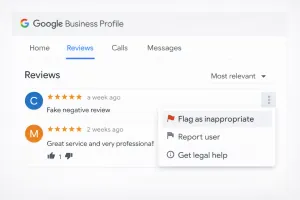
- Log in to your GoogleBusiness Profile account.
- Navigate to the “Reviews” section.
- Find the fake review and click the three-dot menu next to it.
- Select “Flag as inappropriate.”
- Choose the most accurate reason (spam, conflict of interest, impersonation, or offensive content).
- Submit the report.
Google will review the flag within 3 to 5 business days. If the review violates their Terms of Service, it will disappear. If not, you’ll get a generic message saying it doesn’t violate their policies.
Important: Do not flag a review just because it’s negative. Only flag reviews that are clearly fake or violate Google’s rules. Abusing the flagging system can hurt your credibility with Google.

Using the Google Redressal Form (For Legal or Competitor Violations)
If the review involves defamation, impersonation, or a competitor attacking your business, use the Legal Removal Request form.
This is a separate process and requires more documentation, but it’s more effective for serious violations.
- Go to the Google Legal Help page.
- Select “Request review removal based on legal grounds.”
- Provide evidence (screenshots, business records, proof the person was never a customer).
- Submit the form.
This process takes longer, sometimes 2 to 3 weeks, but it has a higher success rate for competitor spam.
Dealing with Fake Reviews: Damage Control While You Wait

Even if you flag a fake review, it stays visible until Google removes it. That could take days or weeks.
You cannot leave it unanswered. Silence looks like guilt.
Here’s how to respond without sounding defensive or angry.
The “We Have No Record of You” Script
Use this when the review is clearly fake and you have no record of the customer.
Example:
“We don’t have any record of serving you or scheduling an appointment under this name. If you believe this is an error, please contact our office directly at [phone number] so we can resolve this. We take customer service seriously and would never ignore a legitimate concern.”
This response does three things:
- Tells future readers the review is likely fake.
- Invites the fake reviewer to prove their claim (they won’t).
- Shows you care about real customers.
The “Competitor Spam” Approach
If the review mentions a competitor or includes obvious spam language, call it out professionally.
Example:
“This review violates Google’s policies by promoting a competitor. We’ve flagged it for removal. If you’re a real customer with a concern, please reach out to us directly so we can make it right.”
Do not name the competitor. Do not get emotional. Stay factual and professional.
When Google Says “No”: What Are Your Options?
Sometimes Google rejects your flag even when the review is clearly fake. This is frustrating, but it happens.
You have three escalation options.
1. Re-flag with More Context
If you have additional evidence (proof the person was never a customer, screenshots of the same account spamming other businesses), re-submit the flag with more detail.
2. Escalate on Twitter/X
Google’s small business support team is more responsive on social media. Tweet at @GoogleMyBiz with a polite explanation and a link to your profile. This doesn’t always work, but it’s faster than waiting for email support.
3. Consult a Defamation Attorney
If the fake review is causing significant financial harm and Google won’t remove it, a lawyer can send a cease-and-desist letter or pursue legal action. This is expensive and should be a last resort.
The Best Defense is a Good Offense: Dilution Strategy
Here’s the truth most reputation management companies won’t tell you: you cannot delete every bad review. Some fake reviews will stay up no matter what you do.
But you can make them irrelevant.
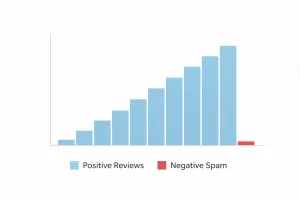
If you have 150 five-star reviews and 3 fake one-star reviews, your rating stays strong and the fake reviews get buried. Homeowners scroll past them. Google’s algorithm weighs recent positive feedback more heavily.
This is called the dilution strategy, and it’s the most effective long-term defense against fake reviews.
How to Generate Consistent Positive Reviews
Most appliance repair companies ask for reviews the wrong way. They send a text after the job and hope the customer remembers. That gets you maybe 1 review for every 20 jobs.
Here’s what actually works:
Ask immediately after the repair. The best time to request a review is while you’re still in the customer’s home. Say something like, “If we took care of you today, we’d appreciate a quick review. It really helps us out.”
Send a follow-up text within 2 hours. Include a direct link to your Google review page. Make it one tap.
Automate the process. Use a system that sends review requests automatically after every completed job. This is what AMPRank does for appliance repair companies. You get consistent 5-star reviews without chasing customers or having to remember to send texts.
Respond to every review. Thank customers for positive reviews. Address concerns in negative reviews. This shows Google and homeowners that you’re engaged and trustworthy.
When you generate 10 to 15 new reviews per month, fake reviews lose their power. Your star rating stays high. Your map ranking improves. And homeowners see a business that’s active, trusted, and legitimate.
What About Review Gating? (Don’t Do It)
Some companies use “review gating,” where they pre-screen customers and only send review requests to happy ones.
This violates Google’s policies and could result in your entire profile being suspended. Do not do this.
Send review requests to every customer and let the results speak for themselves. If you’re doing good work, the positive reviews will outnumber the negative ones.
How AMPRank Protects Your Reputation Automatically
Appliance Marketing Pros built AMPRank specifically for appliance repair companies dealing with reputation problems, inconsistent reviews, and competitor spam.
Here’s how it works:
Automated review requests. Every completed job triggers a review request. No manual work required.
Google Business Profile optimization. We monitor your profile for fake reviews, spam, and policy violations. When something suspicious appears, we flag it immediately.
Review response management. We help you craft professional responses to negative reviews and thank customers for positive ones.
Reputation tracking. You get monthly reports showing your star rating, review volume, and how your reputation compares to local competitors.
This system doesn’t just protect you from fake reviews. It builds a reputation that makes your business the obvious choice when homeowners search for appliance repair on Google Maps.
Conclusion: Don’t Let Trolls Short-Circuit Your Growth
Fake reviews are frustrating, but they don’t have to kill your business. If you know how to spot them, flag them correctly, and respond strategically, you can minimize the damage.
But the real solution is not playing defense. It’s building a reputation system that generates so many positive reviews that fake ones fade into the background.
If your phone has been quieter than usual and you suspect your Google Business Profile is under attack, we can help. Appliance Marketing Pros specializes in reputation management and local SEO for appliance repair companies.
Book a free strategy call and we’ll audit your Google Business Profile, identify any fake reviews or spam, and show you exactly how to protect your reputation while increasing your call volume.
Don’t let competitors sabotage your growth. Let’s AMP it up.