
Blog
Filter Cheap Shoppers in Google Ads
How to Filter Cheap Shoppers in Google Ads (And Only Pay for High-Value Appliance Repair Leads)
You already know the frustration. Someone clicks your Google ad for a broken Sub-Zero refrigerator, you call them back, and they say, “How much do you charge just to come out?” When you explain your dispatch fee or service call policy, they hang up. You just paid $40 for that click, and the person was never going to book.
This happens more often than it should, and it’s not random. It’s a targeting problem. Google Ads doesn’t automatically filter out price shoppers, tire kickers, or people hunting for free advice. If your campaign isn’t built to repel low-intent searchers, you’ll keep burning ad spend on leads that never convert.
I’ve worked with appliance repair companies for years, and the ones who solve this problem see their cost per booked job drop by 30% or more. They don’t get fewer calls. They get better calls. The difference comes down to how you structure your campaigns, what keywords you bid on, and how your ads and landing pages communicate value before the click ever happens.
Why Google Ads Attracts Cheap Shoppers by Default
Google Ads shows your ad to anyone searching for terms related to appliance repair. That includes people ready to book and people just browsing. Without the right filters, your budget gets split between both groups.
The cheapest clickers are usually:
DIY researchers looking for troubleshooting tips
Price shoppers calling five companies to find the lowest rate
Homeowners hoping you’ll waive your dispatch fee
People in apartments or rentals who can’t authorize repairs
Customers outside your service area who clicked anyway
These searches often include phrases like “cheap appliance repair,” “how much does it cost,” “free estimate,” or “near me” from 40 miles away. If your campaign includes broad match keywords or vague ad copy, Google will happily serve your ad to all of them.
The result is a lot of clicks, some phone calls, and very few booked jobs. Your cost per lead looks decent on paper, but your cost per completed service call is terrible.
The Real Cost of Bad Leads in Appliance Repair
A bad lead doesn’t just waste your ad spend. It wastes your time, your dispatcher’s time, and sometimes a technician’s time if they drive out only to get turned away over price.
Let’s say you’re paying $35 per click in a competitive market like Dallas or Phoenix. If 30% of your clicks come from unqualified searchers, you’re burning over $1,000 a month on people who were never going to hire you. That’s $12,000 a year going straight into Google’s pocket with no return.
Worse, those bad leads clog your phone lines. When a high-value customer calls and gets voicemail because your dispatcher is tied up with a price shopper, you lose revenue twice. Once on the wasted click, and again on the missed opportunity.
The fix isn’t to stop running ads. It’s to stop attracting the wrong people in the first place.
How to Filter Cheap Shoppers at the Keyword Level
The fastest way to improve lead quality is to eliminate low-intent keywords. Google Ads gives you full control over what triggers your ads. Most appliance repair campaigns waste money because they cast too wide a net.
Avoid Broad Match Unless You Have Conversion Data
Broad match keywords let Google show your ads for any search it thinks is related. In practice, that means “refrigerator repair” can trigger your ad for “refrigerator repair cost,” “refrigerator troubleshooting,” or “how to fix a refrigerator.”
You’re paying for clicks from people who want information, not service. Unless you have months of conversion data and Smart Bidding properly tuned, broad match will bleed your budget.
Stick with phrase match and exact match. These give you control without losing reach.
Add Negative Keywords Aggressively
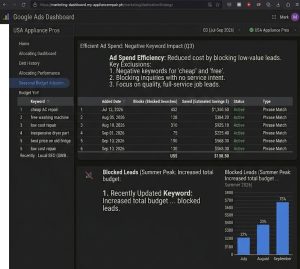
Negative keywords tell Google which searches should never trigger your ads. This is the single most underused feature in appliance repair Google Ads.
Add these to every campaign:
cheap
free
DIY
how to
troubleshooting
cost
estimate (unless you lead with paid dispatch)
parts
manual
warranty
These terms signal price shopping or DIY intent. You’ll still show up in organic search for informational queries, but you won’t pay $30 per click for them.
Every week, review your search terms report in Google Ads. Look for phrases that triggered your ad but didn’t convert. Add those as negatives. After two months of consistent pruning, your click quality improves dramatically.
Target High-Intent, Appliance-Specific Keywords
The best appliance repair leads come from searches that include the appliance type, the problem, and urgency signals. These keywords cost more per click, but they convert at 3x to 5x the rate of generic terms.
Examples of high-intent keywords:
“broken Sub-Zero refrigerator repair”
“Whirlpool washer won’t drain”
“GE oven not heating”
“Samsung dishwasher leaking”
These searchers know what’s wrong, they know they need help, and they’re ready to book. They’re not shopping on price because they understand the appliance is expensive and the repair is specialized.
If you service high-end appliance brands like Sub-Zero, Wolf, Miele, or Thermador, bid aggressively on those terms. The average ticket is higher, the dispatch fee objection is lower, and the customer expects to pay for expertise.
Use Ad Copy to Repel Price Shoppers Before They Click
Your ad copy should pre-qualify leads. If someone is hunting for the cheapest option, your ad should make it clear you’re not a good fit. This sounds counterintuitive, but it works.
Most appliance repair ads say the same thing: “Fast, reliable, licensed.” That’s not filtering anyone. It’s just filling space.
Instead, write ads that emphasize value, expertise, and professionalism. Use language that appeals to customers who care about quality, not just cost.
What to Include in Your Ad Headlines
Your first headline should name the service and the value. Your second headline should call out the type of customer you serve.
Examples:
Headline 1: Expert Sub-Zero Refrigerator Repair
Headline 2: Licensed Technicians, Same-Day Service
Headline 1: Commercial-Grade Appliance Repair
Headline 2: Trusted by Property Managers in Phoenix
Headline 1: High-End Appliance Specialists
Headline 2: Wolf, Sub-Zero, Miele Certified
Notice none of these headlines say “affordable” or “lowest price.” That’s intentional. You want to attract customers who value expertise and speed, not bargain hunters.
What to Include in Your Ad Description
Your description should reinforce trust and set expectations. If you charge a dispatch fee, you can mention it here or wait until the landing page. Either way, don’t hide it.
Examples:
“Factory-trained technicians. We carry OEM parts. Transparent pricing before we start work.”
“Certified on luxury appliance brands. Same-day or next-day appointments available.”
“Serving [City] for over 15 years. Licensed, insured, and highly rated.”
The goal is to sound premium without sounding expensive. You’re filtering for customers who want the job done right, not customers who want the cheapest person willing to show up.
Build a Landing Page That Qualifies Leads for You
Your Google Ads should not send traffic to your homepage. They should send traffic to a dedicated landing page built for one purpose: converting high-intent searchers while discouraging low-intent ones.
What a High-Converting Appliance Repair Landing Page Includes
A clear headline matching the ad. If the ad says “Sub-Zero Refrigerator Repair,” the landing page headline should say the same thing.
A visible phone number at the top. High-intent leads want to call now, not fill out a form.
Proof of credibility. Certifications, years in business, brand partnerships, real customer reviews.
Transparent process. Explain how it works: call, schedule, technician diagnoses, you approve the price, work gets done.
Brand-specific messaging. If you specialize in luxury appliances, say so. Show logos for Sub-Zero, Wolf, Thermador, Miele.
No vague language. Avoid phrases like “affordable” or “great rates.” Use “transparent pricing,” “upfront quotes,” or “no surprises.”
Should You Mention Your Dispatch Fee on the Landing Page?
This depends on your market and your positioning. If you’re in a competitive area where dispatch fees are standard, mention it. If most of your competitors bury the fee until the call, you can too, but be ready to handle objections fast.
The best approach is to frame the dispatch fee as part of your value. For example:
“Our $89 service call fee covers the diagnostic visit and is credited toward any repair over $200.”
This filters price shoppers while reassuring serious customers that you’re not overcharging.
Target High-Income Zip Codes to Avoid Budget-Conscious Leads
One of the most effective filters is geographic. Not every zip code in your service area is equal. Some areas have higher average household incomes, more homeowners, and customers who value quality over price.
Inside Google Ads, you can bid more aggressively on high-income zip codes and reduce or exclude low-income areas. This doesn’t mean refusing service to anyone. It means focusing your ad budget where it converts best.
Look at your past jobs. Which zip codes produced the highest average tickets and the fewest dispatch fee objections? Increase bids by 20% to 50% in those areas. Which zip codes produced the most price shoppers, cancellations, or no-shows? Lower bids or exclude them.
This is one of the simplest ways to improve lead quality without changing anything else in your campaign.
Use Call Tracking to Measure Lead Quality, Not Just Lead Volume
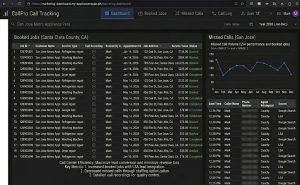
Most appliance repair companies track how many calls they get from Google Ads. That’s not enough. You need to know which calls turned into booked jobs and which ones were dead ends.
Call tracking software like CallRail or WhatConverts lets you tag calls by source, keyword, and outcome. After a month, you’ll see patterns:
Which keywords generate calls that book
Which zip codes produce the most completed jobs
Which ad variations attract serious buyers
Which landing pages convert best
Once you have this data, you can double down on what works and cut what doesn’t. You’ll stop paying for vanity metrics like “calls per week” and start optimizing for revenue per dollar spent.
Common Mistakes That Let Cheap Shoppers Through
Even experienced advertisers make mistakes that attract the wrong leads. Here are the ones I see most often with appliance repair companies.
Using “Near Me” Keywords Without Location Filters
“Appliance repair near me” is a high-volume keyword, but it attracts searchers from all over, including people outside your service area. If your location targeting isn’t tight, you’ll pay for clicks from people 30 miles away who hang up when they hear your travel radius.
Set your campaign to target only the zip codes you actually serve. Use radius targeting cautiously, and exclude areas you won’t travel to.
Running Display or Search Partner Networks
Google Ads offers placement on partner sites and display banner ads. These placements generate cheap clicks and almost never convert for local service businesses. Disable both. Stick to Google Search only.
Not Running Ads on Mobile Separately
Mobile searchers behave differently than desktop users. Mobile clicks are often higher intent because people search while standing in front of a broken appliance. But mobile landing pages need faster load times and click-to-call buttons.
If your landing page takes more than three seconds to load on mobile, you’re losing leads before they even see your offer. Test your page speed and simplify the layout for smaller screens.
Ignoring Your Quality Score
Google’s Quality Score measures how relevant your ad and landing page are to the keyword. A low score means you pay more per click for the same position. A high score means lower costs and better placement.
If your Quality Score is below 7 for your main keywords, your campaign is inefficient. Improve it by tightening keyword match types, rewriting ad copy to match search intent, and making sure your landing page delivers exactly what the ad promises.
What This Looks Like in Practice
One appliance repair company in Southern California was spending $4,500 a month on Google Ads and getting about 80 calls. Sounds good, except only 18 of those calls turned into booked jobs. That’s a 22% booking rate and a cost per booked job over $250.
After restructuring the campaign, adding 60+ negative keywords, targeting only high-income zip codes, and rewriting the landing page to emphasize luxury appliance expertise, the numbers shifted. Monthly spend stayed the same, but calls dropped to 50 per month. Booked jobs increased to 28. Booking rate jumped to 56%, and cost per booked job fell to $160.
Fewer calls, more revenue, better margins. That’s what happens when you stop trying to attract everyone and start filtering for the right leads.
How Appliance Marketing Pros Builds Google Ads Campaigns That Convert
At Appliance Marketing Pros, we don’t run generic search campaigns. We build appliance-repair-specific Google Ads systems that filter cheap shoppers, target high-value leads, and integrate with your call tracking and CRM.
Our process includes:
Keyword research focused on appliance-specific, high-intent searches
Negative keyword lists built from thousands of appliance repair campaigns
Ad copy that pre-qualifies leads based on brand, urgency, and service level
Landing pages designed to convert serious customers and repel tire kickers
Zip code targeting and bid adjustments based on income and conversion data
Weekly campaign monitoring and search term pruning
Call tracking integration so you know exactly what’s working
We manage Google Ads campaigns for appliance repair companies across the United States, and we’ve seen what works in competitive markets and in smaller cities. Our goal is simple: predictable, high-quality lead flow that turns into booked jobs and revenue growth.
If you’re tired of paying for clicks that don’t convert, schedule a strategy call with us. We’ll review your current campaigns, show you where you’re losing money, and build a plan to bring in better leads without increasing your ad spend.