Blog
Beyond Clicks: Turning Google Ads into Booked Appointments
Strategies for Turning Google Ads into Booked Appointments
You’re spending money on Google Ads. You’re getting clicks. But your phone isn’t ringing the way it should, and when it does, half the calls are tire kickers or people looking for free quotes they’ll never act on.
Sound familiar?
Most appliance repair business owners we talk to have the same problem. They’ve been told Google Ads will bring them customers, but what they actually get is traffic that doesn’t convert, leads that ghost them, or calls from people three towns over who aren’t even in their service area.
The issue isn’t that Google Ads doesn’t work for appliance repair. It absolutely does. The problem is that most campaigns are set up to generate clicks, not booked appointments. And there’s a massive difference between the two.
This guide walks you through how to restructure your Google Ads strategy so every dollar you spend is focused on one thing: getting qualified leads to schedule service calls with your business.
Why Most Appliance Repair Google Ads Campaigns Fail
Let’s start with what’s probably going wrong right now.
You’re targeting the wrong keywords. Most campaigns go after broad terms like “appliance repair” or “fix my dishwasher.” Those searches get volume, but they’re filled with people who are just starting to look around. They’re not ready to book. They’re comparing prices, checking reviews, and probably calling six other companies.
Your ad copy sounds like everyone else’s. If your ad says “Fast, Reliable, Affordable Appliance Repair,” congratulations. You sound exactly like the 47 other companies running ads in your market. There’s nothing in that message that makes someone choose you over the next result.
Your landing page is your homepage. When someone clicks your ad for Samsung refrigerator repair and lands on a generic homepage with a slideshow and a paragraph about your company history, they’re gone. They wanted an answer to their specific problem, and you gave them a brochure.
You’re not tracking what actually matters. Clicks don’t pay your bills. Booked appointments do. If you’re not tracking phone calls, form submissions, and which keywords are driving actual jobs, you’re flying blind.
Your bids are set to maximize clicks, not conversions. Google’s default settings are designed to get you the most clicks for your budget. That’s not the same as getting you the most customers. If you’re using automated bidding without conversion tracking in place, you’re teaching Google to find people who click ads, not people who hire technicians.
These aren’t small tweaks. They’re fundamental problems that keep your ads from doing what they’re supposed to do: fill your schedule with paying customers.
What “Conversion-Focused” Google Ads Actually Means
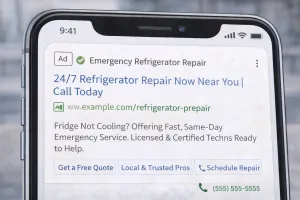
When we say conversion-focused, we mean your entire campaign is built around one goal: getting someone to pick up the phone or fill out a booking form.
Everything else is secondary.
That means your keywords, your ad copy, your landing pages, your bid strategy, and your tracking all need to work together to move people from “I have a broken appliance” to “I’m scheduling service with this company.”
Here’s what that looks like in practice.
Start with High-Intent Keywords
You want to target people who are ready to hire someone right now, not people who are just browsing.
High-intent keywords for appliance repair include:
- Brand and appliance type: “Samsung refrigerator repair near me”
- Urgent problem phrases: “dishwasher leaking water repair”
- Same-day or emergency modifiers: “emergency washer repair”
- Specific error codes: “LG dryer error code D80”
These searches come from people who have a problem they need fixed today. They’re not comparison shopping. They’re looking for a technician who can show up and solve it.
Avoid broad, low-intent keywords like:
- “How to fix a refrigerator”
- “Appliance repair cost”
- “DIY dishwasher repair”
Those searches are from people who either want to fix it themselves or are just gathering information. They’re not ready to book, and they’ll waste your budget.
Use Exact and Phrase Match, Not Broad Match
Broad match keywords sound great in theory. Google shows your ad for anything “related” to your keyword, which means more reach.
In reality, broad match burns through your budget on irrelevant searches.
If you bid on “refrigerator repair” using broad match, your ad might show up for:
- “Refrigerator repair manual”
- “How much does refrigerator repair cost”
- “Refrigerator repair parts near me”
None of those are people looking to hire you.
Stick with exact match and phrase match. You’ll get fewer impressions, but the people who see your ad will actually be in-market for your service.
Segment Your Campaigns by Appliance Type
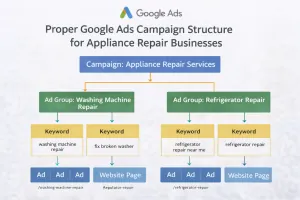
Don’t lump all your keywords into one campaign. Break them out by appliance type so you can control your budget, write specific ad copy, and send people to dedicated landing pages.
Your campaign structure should look something like this:
- Campaign 1: Refrigerator Repair
- Ad Group: Samsung Refrigerator Repair
- Ad Group: LG Refrigerator Repair
- Ad Group: GE Refrigerator Repair
- Ad Group: Emergency Refrigerator Repair
- Campaign 2: Washer Repair
- Ad Group: Front Load Washer Repair
- Ad Group: Top Load Washer Repair
- Ad Group: Washer Won’t Drain Repair
- Campaign 3: Dryer Repair
- Ad Group: Dryer Not Heating Repair
- Ad Group: Dryer Making Noise Repair
This structure gives you control. You can allocate more budget to the appliances that bring in the most revenue. You can write ad copy that speaks directly to the problem. And you can send people to landing pages that match exactly what they searched for.
Write Ad Copy That Speaks to the Problem
Your ad copy needs to do three things:
- Match the search intent
- Differentiate you from competitors
- Give someone a reason to call you instead of the next result
Here’s a formula that works:
Headline 1: Match the keyword + urgency or benefit
Example: “Samsung Fridge Not Cooling? Same-Day Repair”
Headline 2: Trust signal or differentiator
Example: “Certified Techs | 1,200+ 5-Star Reviews”
Headline 3: Clear call to action
Example: “Book Online or Call Now”
Description 1: Expand on the benefit and address the pain point
Example: “We specialize in Samsung refrigerator repairs. Most jobs completed the same day. No hidden fees, just fast, reliable service.”
Description 2: Reinforce trust and make it easy to take action
Example: “Licensed and insured. Serving [Your City] since 2015. Call now or book your appointment online in 60 seconds.”
Notice what’s not in there: generic phrases like “quality service” or “affordable rates.” Everyone says that. It doesn’t mean anything.
Instead, focus on:
- Specificity: Samsung refrigerator, not just appliances
- Urgency: Same-day repair
- Proof: 1,200+ reviews
- Ease: Book online or call
Use Ad Extensions to Take Up More Space
Ad extensions make your ad bigger, more visible, and more useful. They also improve your click-through rate, which helps your Quality Score and lowers your cost per click.
Use these extensions every time:
Call extensions: Let people click to call directly from the ad. This is critical for mobile searches.
Sitelink extensions: Link to specific service pages like “Refrigerator Repair,” “Washer Repair,” “Emergency Service,” and “Service Area.”
Callout extensions: Highlight key benefits like “Same-Day Service,” “Licensed & Insured,” “No Trip Charges,” “All Major Brands.”
Location extensions: Show your address and distance from the searcher. This builds trust and helps with local intent.
Structured snippets: List brands you service or types of repairs you handle.
Extensions don’t cost extra, and they make your ad more competitive. There’s no reason not to use them.
Build Landing Pages That Convert
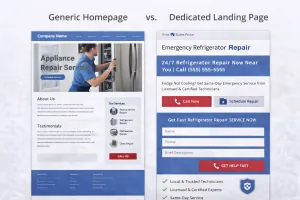
This is where most campaigns fall apart.
You can have perfect keywords and great ad copy, but if your landing page doesn’t deliver on the promise, people will bounce. And every bounce is money you just threw away.
Here’s what a high-converting landing page for appliance repair looks like:
Match the Ad Message
If your ad is about Samsung refrigerator repair, your landing page should be about Samsung refrigerator repair. Not your homepage. Not a generic appliance repair page. A dedicated page that speaks directly to that search.
The headline should echo the ad. If your ad says “Samsung Fridge Not Cooling? Same-Day Repair,” your landing page headline should say something like “Expert Samsung Refrigerator Repair | Same-Day Service Available.”
Lead with the Problem
People clicked your ad because they have a problem. Acknowledge it right away.
Example:
“Is your Samsung refrigerator not cooling? Making strange noises? Leaking water? We fix it fast.”
This shows you understand what they’re dealing with and positions you as the solution.
Make Your Call to Action Obvious
Your phone number should be at the top of the page, large, and clickable on mobile. Most appliance repair searches happen on phones, and people want to call immediately.
Include a contact form as a secondary option, but don’t hide the phone number. Some business owners worry that making the phone number too prominent will lead to unqualified calls. That’s backwards thinking. You want calls. Qualified people will call when they see you’re the right fit.
Show Trust Signals
People are inviting a stranger into their home to fix an expensive appliance. They need to trust you before they pick up the phone.
Include:
- Google reviews (actual star rating and review count)
- Photos of your technicians
- Certifications or manufacturer authorizations
- Service guarantee or warranty information
- Years in business
- Service area coverage
Don’t just say “trusted” or “reliable.” Prove it.
Keep the Form Simple
If you’re using a contact form, ask for the bare minimum:
- Name
- Phone number
- Appliance type and issue
- Zip code
That’s it. Every extra field you add reduces conversions. You can get the rest of the details when they call or when your technician arrives.
Remove Distractions
No navigation menu. No links to your blog. No “About Us” page link.
Your landing page has one job: get someone to call or submit a form. Anything that doesn’t support that goal is a distraction.
Set Up Conversion Tracking the Right Way
If you’re not tracking conversions, you’re guessing. And guessing is expensive.
Conversion tracking tells you which keywords, ads, and campaigns are actually generating booked appointments. Without it, you have no idea if your ad spend is working.
Track Phone Calls
Most appliance repair leads come through phone calls, not forms. If you’re not tracking calls, you’re missing the majority of your conversions.
Use Google’s call tracking or a third-party service like CallRail. This gives you a unique phone number for your ads so you can see exactly which keywords and campaigns are driving calls.
You’ll also want call recording (with proper disclosure). Listening to your calls helps you understand:
- What questions people are asking
- How your staff is handling inquiries
- Which calls are qualified leads vs. spam or wrong numbers
Track Form Submissions
Set up conversion tracking for your contact form using Google Tag Manager or your website platform’s built-in tools.
Make sure the thank-you page or confirmation message fires a conversion event. This tells Google that someone completed the form, which helps with bid optimization.
Import Offline Conversions
The ultimate conversion isn’t a call or a form. It’s a booked appointment and a completed job.
If you use a CRM or scheduling system, you can import offline conversions back into Google Ads. This shows Google which leads turned into actual revenue, which makes your automated bidding way more effective.
This takes more setup, but it’s worth it if you’re spending more than $2,000 per month on ads.
Use Smart Bidding to Optimize for Appointments
Once you have conversion tracking in place, you can switch from manual bidding to automated bidding strategies that optimize for actual results.
Here’s how to do it:
Start with Manual CPC
When you first launch a campaign, you don’t have conversion data yet. Start with manual cost-per-click bidding so you can control how much you’re paying and gather data.
Run this for at least two weeks or until you have 15-20 conversions.
Move to Maximize Conversions
Once you have enough conversion data, switch to Maximize Conversions. This tells Google to get you as many conversions as possible within your budget.
This works well if your goal is volume and you’re happy with the quality of leads you’re getting.
Upgrade to Target CPA or Maximize Conversion Value
If you want more control, use Target CPA (cost per acquisition). You tell Google how much you’re willing to pay per conversion, and it adjusts bids to hit that target.
If you’ve imported offline conversion values (like job revenue), use Maximize Conversion Value. This optimizes for the highest-value leads, not just the most leads.
This is the most advanced strategy and works best when you have at least 30 conversions per month.
Give It Time to Learn
When you switch bidding strategies, Google needs time to learn. Performance might dip for the first week or two. That’s normal. Let it run for at least two weeks before making changes.
Use Negative Keywords to Filter Out Junk Traffic
Negative keywords are just as important as your target keywords. They prevent your ads from showing up for irrelevant searches that waste your budget.
Common negative keywords for appliance repair include:
- DIY
- How to
- Manual
- Parts
- Wholesale
- Jobs
- Careers
- Reviews (unless you’re specifically targeting review searches)
- Free
- Cost (if you don’t want price shoppers)
Check your search terms report weekly and add negatives as you go. You’ll always find new junk searches to filter out.
Focus Your Budget on What’s Working
Not all keywords and campaigns perform equally. Once you have a few weeks of data, reallocate your budget based on what’s actually driving booked appointments.
If refrigerator repair is bringing in twice as many jobs as dryer repair, shift more budget to refrigerators. If Samsung-specific keywords convert better than generic appliance searches, prioritize Samsung.
This sounds obvious, but most business owners set their budget once and forget about it. The best results come from constant optimization.
Integrate Google Ads with Your Google Business Profile
Your Google Ads and your Google Business Profile should work together, not in isolation.
Make sure your GBP is fully optimized:
- Complete business information
- Accurate service areas
- Regular posts and updates
- Respond to all reviews
- High-quality photos of your team and work
When someone clicks your ad, they’ll often check your Google Business Profile before calling. If your profile is incomplete or has bad reviews, they’ll move on to the next result.
Also consider running Local Services Ads alongside your search ads. LSAs show up at the very top of search results with a Google Verified badge. You only pay when someone contacts you directly through the ad, which makes them extremely cost-effective for service businesses.
Track the Metrics That Actually Matter
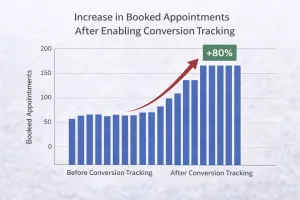
Forget about impressions and clicks. Those are vanity metrics.
Here’s what you should be tracking:
Conversion rate: What percentage of clicks turn into calls or form submissions? If this is below 5%, your landing page or ad copy needs work.
Cost per conversion: How much are you paying for each call or form submission? This should be well below your average job value.
Cost per booked appointment: If you’re tracking offline conversions, this is your most important metric. How much does it cost to get someone on your schedule?
Return on ad spend (ROAS): For every dollar you spend on ads, how much revenue are you generating? A good target is 3:1 or higher, meaning every $1 spent returns $3 in revenue.
Call-to-booking rate: What percentage of calls turn into booked appointments? If this is low, the issue might be your phone handling, not your ads.
Review these metrics weekly. If something’s off, dig into the data to figure out why and fix it.
Common Mistakes to Avoid
Running ads without a clear service area. If you’re showing ads to people 50 miles outside your coverage zone, you’re paying for leads you can’t serve. Use location targeting and radius settings to focus on your actual service area.
Not answering the phone. If you’re spending money on ads but missing calls, you’re lighting money on fire. Use call forwarding, hire an answering service, or set up a system to return calls within 15 minutes.
Sending all traffic to your homepage. We covered this already, but it’s worth repeating. Dedicated landing pages convert 3-5 times better than homepages.
Ignoring mobile users. Over 70% of appliance repair searches happen on mobile. If your landing page isn’t mobile-friendly or your phone number isn’t clickable, you’re losing most of your leads.
Stopping ads when you get busy. Consistency is key. If you turn ads off every time your schedule fills up, you’ll end up in a feast-or-famine cycle. Keep ads running and adjust your budget or bids instead.
What This Looks Like in Practice
Let’s say you run a three-person appliance repair company in a mid-sized city. You’re spending $1,500 per month on Google Ads, and you’re getting about 45 clicks.
Here’s how a conversion-focused campaign would perform:
- 45 clicks per month
- 10% conversion rate = 4-5 calls or form submissions per week
- 60% call-to-booking rate = 2-3 booked appointments per week
- Average job value of $250
- Monthly revenue from Google Ads: $2,000-$3,000
That’s a 1.3:1 to 2:1 return on ad spend in the first month. As you optimize and improve your conversion rate, that number goes up.
Compare that to a click-focused campaign:
- 45 clicks per month
- 2% conversion rate = 1 call per week
- 40% call-to-booking rate = 2 booked appointments per month
- Monthly revenue from Google Ads: $500
Same budget. Completely different results.
Your Next Steps
If you’re ready to stop wasting money on clicks and start generating real appointments, here’s what to do:
- Audit your current Google Ads campaign. Look at your keywords, ad copy, landing pages, and conversion tracking. Identify the biggest gaps.
- Set up proper conversion tracking for phone calls and form submissions. You can’t optimize what you don’t measure.
- Build dedicated landing pages for your top three appliance types. Match them to your most important keywords.
- Rewrite your ad copy to focus on specific problems, urgency, and trust signals.
- Add negative keywords to filter out irrelevant traffic.
- Review your metrics weekly and adjust based on what’s working.
If this feels like a lot to manage on top of running your business, you’re not wrong. Most appliance repair owners don’t have time to become Google Ads experts. That’s why we built AMPRank: a complete system that handles your Google Ads, local SEO, and lead tracking so you can focus on fixing appliances.
We’ve spent years working exclusively with appliance repair companies, and we know exactly what it takes to turn ad spend into predictable, high-quality appointments. If you want to see how we’d approach your specific market, book a free strategy call. We’ll walk through your current setup, show you where the opportunities are, and give you a clear plan for what’s possible.
No pressure. No generic pitch. Just real answers from people who do this every day.
Schedule Your Free Strategy Call →