
Blog
The 48-Hour Google Business Profile Recovery Scramble
Google Business Profile Recovery: How to Reinstate Your Appliance Repair Listing in 48 Hours
Your phone went quiet overnight.
You check Google Maps and see it. The red banner. “This profile has been suspended.”
Every search for refrigerator repair or washer service in your city now shows your competitors. Your reviews are gone. Your listing disappeared. And every missed call this week is money you’ll never get back.
If you’re an appliance repair business owner dealing with a suspended Google Business Profile, you’re in the middle of a local SEO emergency. The good news is that most suspensions can be fixed if you act fast and follow the right steps. The bad news is that most business owners waste days doing it wrong.
This guide walks you through exactly how to diagnose the suspension, fix the violation, gather the proof Google wants, and submit a reinstatement request that actually works.
The Local SEO Emergency: What a GBP Suspension Means for Your Service Calls
When your Google Business Profile gets suspended, you lose more than visibility. You lose the primary way customers find local appliance repair companies.
Most homeowners search “refrigerator repair near me” or “dishwasher service” and click the first three Google Maps results. If your profile is suspended, you don’t show up. Your phone stops ringing. Your technicians sit idle. And your competitors pick up the work you should be booking.
A suspension can happen overnight with no warning. Google’s automated system flags profiles that violate guidelines, even if the violation was unintentional. Once flagged, your listing disappears from Maps and local search until you successfully appeal.
The cost adds up fast. If you normally book 10 service calls per week through your Google listing, a two-week suspension could mean 20 lost jobs. At an average ticket of $250, that’s $5,000 in lost revenue while you scramble to fix the problem.
Speed matters. The faster you identify the violation, correct it, and submit proof, the faster you get back in front of customers.
Top Reasons Appliance Repair GBPs Get Suspended
Google suspends profiles for guideline violations. Understanding the most common reasons appliance repair businesses get flagged helps you fix the issue quickly and avoid future problems.
Displaying Your Home Address as a Service Area Business
This is the number one reason appliance repair companies get suspended.
If you run your business from home and travel to customer locations, you are classified as a Service Area Business (SAB). Google’s rules say SABs cannot display a physical street address on their profile. You’re only allowed to show service areas, like cities or zip codes.
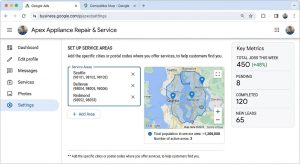
Many appliance repair owners set up their GBP years ago and included their home address because it felt more legitimate. Google now treats that as a violation. If your profile shows a home address and you don’t have a storefront where customers can walk in, you’ll get suspended.
The fix is simple but requires proof. You need to hide your address and clearly define your service areas. But you can’t just change it and resubmit. You need to show Google that you understand the SAB rules and provide documentation proving you’re a real, operating business.
Keyword Stuffing Your Business Name
Another common mistake is adding keywords to your business name in your Google Business Profile.
Your legal business name might be “Mike’s Appliance Repair LLC.” But some marketing advice tells you to list it as “Mike’s Appliance Repair | Same-Day Refrigerator & Washer Service in Orlando.”
Google sees that as spam. Your business name field is supposed to match your real, registered business name. Adding service keywords, city names, or extra descriptors violates guidelines and can trigger an immediate suspension.
If you keyword-stuffed your business name, the fix is straightforward. You need to change it back to your actual legal name and provide proof of business registration that matches.
Using a Virtual Office or P.O. Box
Google does not allow virtual offices, coworking spaces, or P.O. boxes as your business address unless you have a physical location where customers can visit during stated hours.
If you listed a UPS Store mailbox or a Regus office address on your profile, Google will suspend you the moment they verify it. This happens more often than people think, especially when business owners try to rank in multiple cities by creating separate profiles with different virtual addresses.
The solution is to either operate as a Service Area Business with no address displayed, or provide proof of a real, staffed location with signage and regular hours.
Violating Google’s Content Policies
Less common but still serious are content violations. These include:
- Using stock photos instead of real images of your team, trucks, or service work
- Adding fake reviews or paying for reviews
- Posting misleading information about services you don’t actually provide
- Creating duplicate profiles for the same business
Google’s algorithm is built to detect patterns. If you suddenly get 15 five-star reviews in two days from accounts with no other activity, you’ll get flagged. If your profile images are generic stock photos of appliances, it signals low trust.
How to Submit a Google Business Profile Recovery
Once you know why your profile was suspended, follow this process to get reinstated as quickly as possible.
Step 1: Fix the Violation First
Do not submit a reinstatement request until you’ve corrected the issue.
If you displayed a home address, hide it and set up service areas. If you keyword-stuffed your business name, change it to your legal name. If you used a virtual office, remove it and prepare SAB documentation.
Google reviews your reinstatement request manually. If they look at your profile and the violation is still there, they’ll deny your appeal immediately. That delays your recovery by another week or more.
Log into your Google Business Profile dashboard. Make the necessary changes. Save them. Wait 10 minutes and check your public-facing profile to confirm the updates went through.
Step 2: Gather Bulletproof Proof of Business
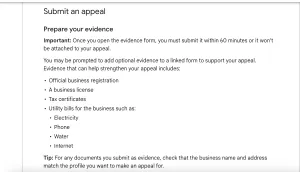
Google wants to see that you are a legitimate, operating appliance repair business. The stronger your proof, the faster you get reinstated.
Here’s what works best:
Business registration documents. Your LLC registration, DBA filing, or business license that shows your legal name and registration date. This proves you’re a real registered entity.
Utility bills in the business name. A recent electric, gas, or water bill showing your business name and service address. This proves you operate from a real location, even if it’s home-based.
Branded vehicle photos. Pictures of your service van or truck with your business name, logo, and phone number clearly visible. This is one of the strongest signals for appliance repair businesses because it shows you’re out in the field doing real work.
Tool and equipment invoices. Receipts for appliance repair tools, parts suppliers, or equipment purchases. This reinforces that you’re actively performing the services you claim.
Business insurance certificate. General liability or workers’ comp insurance in your business name. Many appliance repair companies already carry this, and it’s excellent proof.
Website with real service content. A live website with your business name, contact information, service descriptions, and real photos. Google checks for consistency across your online presence.
Scan or photograph everything. Save files as PDFs or high-resolution images. You’ll upload these when you submit your appeal.
Step 3: Submit the Reinstatement Form
Go to the Google Business Profile Help Center and search for “reinstatement request.” You’ll find the official form.
Fill it out carefully. Explain what caused the suspension, what you fixed, and why your business is legitimate. Be clear and factual. Don’t argue or complain. Google reviewers process hundreds of these requests and respond better to straightforward explanations.
Upload your proof of business documents. Attach as many as you can. More proof equals faster approval.
Submit the form. Google will send a confirmation email with a case ID. Save that email. You’ll need the case ID if you need to follow up.
How Long Does Reinstatement Take?
Google’s official timeline is 3 to 5 business days, but in practice, most appliance repair GBP reinstatement requests are reviewed within 2 to 7 days.
If your proof is strong and your violation is clearly fixed, you can see your profile go live in 48 to 72 hours. If your documentation is weak or Google needs clarification, it can take two weeks or longer.
During the waiting period, do not submit multiple appeals or try to create a new profile. That signals manipulation and can result in a permanent ban.
Check your email daily. Google will notify you when your profile is reinstated or if they need additional information.
If your appeal is denied, read the denial message carefully. Google usually explains what’s missing. Gather better proof and resubmit.
Common Mistakes That Delay Reinstatement
Most delays happen because business owners skip steps or submit weak evidence.
Submitting the appeal before fixing the violation. If your address is still showing or your business name still has keywords, Google denies the request immediately.
Using someone else’s documents. If your utility bill is in your spouse’s name or your truck photo shows a different company logo, Google won’t accept it. Everything needs to match your registered business name.
Providing low-quality images. Blurry photos or screenshots of documents won’t work. Use clear scans or high-resolution images.
Creating a new profile while waiting. This violates Google’s duplicate listing policy and can get both profiles permanently banned.
Ignoring follow-up requests. If Google emails asking for clarification or additional proof, respond within 24 hours. Delays reset the review clock.
What Happens to Your Reviews and Ranking?
When your profile is suspended, your reviews and star rating disappear from public view. Once reinstated, they come back.
Your ranking, however, takes a hit. Google’s local algorithm factors in consistency and activity. A suspension signals instability. After reinstatement, it can take 2 to 4 weeks for your profile to recover its previous ranking position.
You can speed recovery by:
- Posting fresh Google Business updates weekly
- Responding to all reviews, old and new
- Adding new photos of your team and service work
- Encouraging recent customers to leave honest reviews
The key is to show Google that your profile is active, legitimate, and trustworthy.
How to Prevent Future Suspensions
Once you’re reinstated, follow these rules to stay compliant:
Never display a home address if you’re a Service Area Business. Only show service areas.
Use your exact legal business name. No keywords, no city names, no extra descriptors.
Keep your business information consistent. Your name, phone number, and website should match across Google, your website, and your business registration.
Use real photos only. No stock images. Take pictures of your team, trucks, tools, and actual service calls.
Don’t manipulate reviews. Never pay for reviews, incentivize reviews, or use review-generation software that violates Google’s policies.
Update your profile regularly. Add posts, respond to reviews, and refresh your photos every few months. Active profiles are less likely to get flagged.
Stop Losing Leads: Let AMP Fix Your Suspension and Protect Your Profile
Dealing with a suspended Google Business Profile is stressful. You’re losing calls every day the problem isn’t fixed. And one mistake in the reinstatement process can delay recovery by another week.
At Appliance Marketing Pros, we’ve handled dozens of GBP suspensions for appliance repair companies. We know exactly what Google wants to see. We gather the right proof, submit appeals that get approved, and help you stay compliant so it doesn’t happen again.
If your profile is suspended right now, we can handle the entire recovery process and get you back online fast. If you’ve already submitted an appeal and it was denied, we can review your case and resubmit with stronger documentation.
And once your profile is restored, our AMPRank system keeps your listing optimized, your rankings strong, and your call volume predictable.
Don’t let a suspension cost you another week of lost revenue. Schedule a strategy call with Appliance Marketing Pros today. We’ll review your situation, show you exactly what needs to happen, and get your Google Business Profile back to bringing in service calls.
AMP up your growth. Let’s get your profile reinstated and your phone ringing again.