
Blog
Google Business Profile Reinstatement for Appliance Repair Pros

Why Every Appliance Repair Company Needs a Google Business Profile
Your Google Business Profile is the backbone of your local visibility. When customers search for appliance repair services on Google Maps or Google Search, your profile drives calls, directions, and bookings. But if your profile gets suspended, you disappear overnight. That’s where Google Business Profile reinstatement comes in. By getting your profile reinstated, you can protect your visibility, regain trust, and continue to attract leads.
Understanding Google Business Profile Suspensions
A Google Business Profile suspension can happen without warning. You might receive an email notification that your business profile is suspended because your business information doesn’t match public records, or because Google believes your listing is violating guidelines.
Common reasons behind the suspension:
- Using a business name that doesn’t match your official business registration or business license
- Having multiple profiles for the same business
- Entering the wrong business name and address
- Running a service area business without proper documentation
- Adding information on your profile that Google may consider misleading
When your Google Business Profile is suspended, you lose calls, website visits, and trust. For an appliance repair company that depends on quick local leads, a suspended Google Business Profile listing can cut off a major source of growth.
The Reinstatement Process Explained
The reinstatement process begins when you submit a reinstatement request to Google. This means logging into your Google account, finding the profile ID, and explaining why the profile should be reinstated. You’ll also provide proof of the legitimacy of your business, such as a business license, utility bill, or lease agreement.
When you’re submitting your reinstatement request, Google will review the information that you provide. Google support may reach out if more documentation is needed. The review process typically takes a few days, but it may take longer if Google suspends your profile due to complex reasons.
If your reinstatement request is denied, it means Google may believe your profile violates its rules. In that case, you’ll need to correct the errors in your suspended profile and resubmit it.
Best Practices to Prepare for Reinstatement
Before you request a reinstatement, make sure your profile matches official documents:
- Match the business name and address to your license or registration
- Provide proof of the legitimacy of your business with utility bills or state documents
- Clean up any duplicate listings, since profiles for the same business can lead to suspension
- Keep your business information consistent across all online directories
Doing this upfront raises your chances of having your profile reinstated on the first attempt.
Step-by-step: Reinstate a suspended Google Business Profile (with sources)
-
Check the suspension notice & eligibility
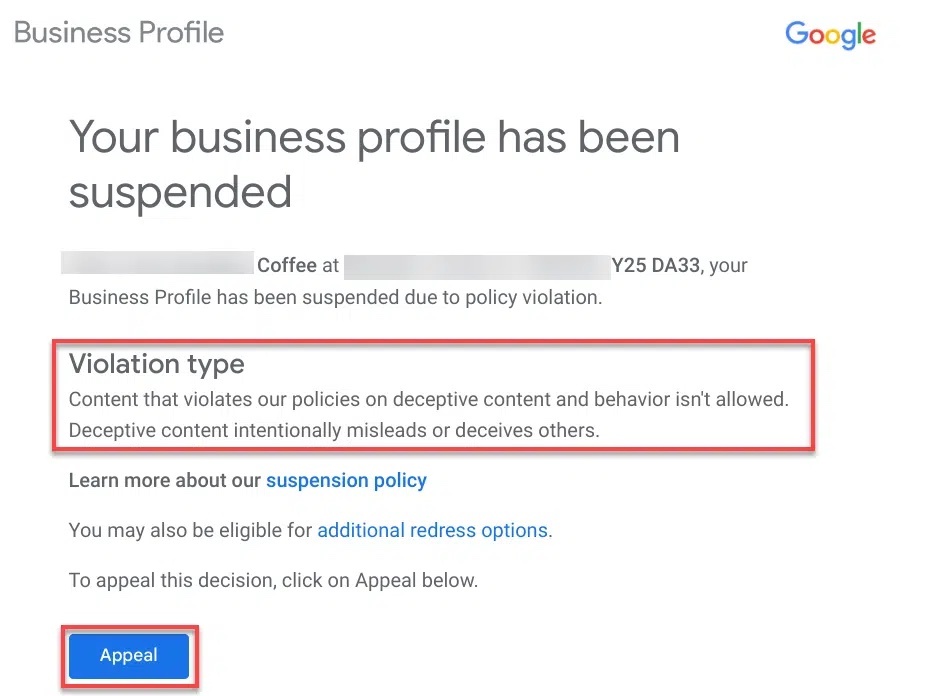
Open Google’s email or in-product banner. If it includes “Appeal”, that’s the path into Google’s Appeals tool. Before appealing, make sure your profile follows Google’s guidelines. Google Help
-
Open the Appeals tool & pick the right profile
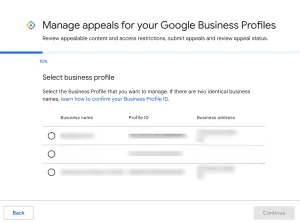
In Manage appeals, confirm you’re on the correct Google account and select the suspended business profile you want to appeal.
-
Review the decision details
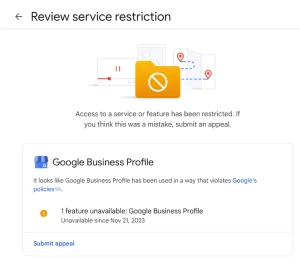
You’ll see the reason/status (e.g., “Eligible for appeal”). If it’s appealable, proceed to the next screen to start your appeal.

-
Upload evidence & explain what you fixed
Provide a short narrative explaining why the profile should be reinstated and upload official documents that prove the business is legitimate (e.g., registration, license, tax certificate, utility bill). Important: once you submit the appeal screen, you have ~60 minutes to upload evidence.
-
Submit & track status
Submit the appeal and monitor the status in the Appeals tool. If Google asks for more information, reply promptly through the email/thread you receive. Google Help
Quick checklist (evidence to prepare)
-
Government business registration or license
-
Tax certificate (where applicable)
-
Recent utility bill showing the same business name & address as your profile
-
A concise explanation of corrections you made (e.g., fixed name/address, removed keywords)
Leveraging GBP Reinstatement for Marketing Success
Once your Google Business Profile reinstatement is approved, your listing will no longer be. Now is the time to improve your marketing.
- Update your photos and services so customers see accurate information about your business
- Add your service categories so you appear in more searches
- Use your reinstated profile to strengthen local SEO and attract more calls
Every time your profile is reinstated, you gain an edge over competitors whose profiles are still suspended.
Boosting Operations After Reinstatement
When your google business profile reinstatement is approved, it’s not the end of the process. It’s the beginning of rebuilding your visibility and strengthening daily operations. Here’s how appliance repair pros can make the most of their reinstated profile.
1. Rebuild trust with reviews
After Google Business Profile reinstatement, ask satisfied customers to leave reviews. Reviews help restore credibility after a suspension. A steady flow of new feedback shows Google and potential customers that your business is legitimate and active.
2. Keep your business name and address accurate
One of the most common reasons for another suspension is mismatched information. After your Google Business Profile reinstatement, always make sure your business name and address match your official documents and website. Consistency across directories, invoices, and signage prevents another suspension of the Google Business Profile.
3. Update hours and service areas
If your hours or service areas changed during the suspension, fix them right away. Accurate hours prevent bad customer experiences, and updated service areas help you rank better in local SEO searches. This small update after Google Business Profile reinstatement improves operations and customer trust.
4. Use Google’s messaging feature
Turn on messaging in your profile so potential customers can reach you directly. Quick replies often convert into real jobs. Since Google Business Profile reinstatement restores your messaging feature, use it to capture leads before they call a competitor.
5. Track performance in the dashboard
Use the Google Business Profile help dashboard to track calls, direction requests, and website clicks. After Google Business Profile reinstatement, these numbers give you proof of how well your listing supports your operations. If you notice trends, such as many calls coming in outside your posted hours, you can adjust your operations to capture more business.
Driving More Leads Post-Reinstatement
Your reinstated profile is a powerful tool if you use it effectively. Here’s how appliance repair pros maximize it:
- Run Local Services Ads and point them to your Google Business Profile listing
- Add Q&A with common repair questions to engage prospects
- Use Google Maps insights to measure how many calls and clicks you receive
With your profile reinstated, you’re back on top in local searches and ready to drive more business.
Common Pitfalls to Avoid After Reinstatement
A business profile can be suspended again if the same mistakes are made. To avoid this:
- Don’t change your business information without proof. Mismatched business names and addresses often lead to suspension.
- Avoid creating multiple profiles. A suspended GBP often happens when profiles for the same business exist.
- Don’t ignore an email from Google. Email notifications about changes or requests must be handled promptly.
Turning Setbacks Into Growth Opportunities
A suspension of your Google Business Profile can feel like a major setback, but the reinstatement process provides an opportunity to reset your marketing efforts. By understanding why your profile can be suspended and following the steps to reinstate a suspended Google Business, you establish a stronger foundation for generating leads and driving growth.
For appliance repair pros, Google Business Profile reinstatement isn’t just about fixing a problem. It’s about ensuring your business is legitimate, visible, and trusted by local customers on Google. Done right, you’ll get reinstated after a Google suspension and be ready to amp up your growth.