
Blog
Optimizing Your Appliance Repair Website for Conversions

You’re paying for Google Ads. Your website gets traffic. Your phone still isn’t ringing like it should.
Sound familiar?
Most appliance repair business owners deal with this disconnect every month. The visitors show up, look around for 20 seconds, and leave. Then they call your competitor down the street.
The problem isn’t usually your service. It’s not even your pricing. It’s that your website isn’t built to convert appliance repair leads the way it needs to.
In this guide, we’ll break down exactly what separates websites that generate consistent leads from the ones that just look nice. No generic marketing fluff. Just what actually works when you’re trying to get homeowners to trust you enough to let you into their house to fix their broken fridge.
Why Most Appliance Repair Websites Get Traffic But Not Calls
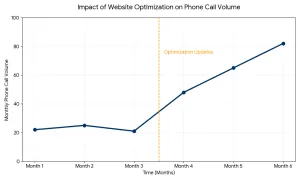
Your website might be getting 500 visits a month and producing 5 phone calls. Your competitor gets 300 visits and books 25 jobs.
The difference isn’t traffic volume. It’s conversion rate.
Here’s what happens in the first five seconds after someone lands on your site. They’re asking themselves three questions:
- Can this company fix my specific problem?
- Can I trust them to come into my home?
- How do I contact them right now?
If your website doesn’t answer these questions immediately and clearly, they hit the back button. Google shows them the next result. That’s your competitor’s phone ringing instead of yours.
The 5-Second Trust Test
Most homeowners searching for appliance repair are in a stress situation. The fridge is leaking. The washer won’t drain. The dryer is making a horrible noise.
They don’t have patience for slow-loading sites, buried phone numbers, or vague promises. They need to know right now whether you’re legitimate and available.
Your website has about five seconds to prove both of those things.
If your most prominent feature is a stock photo of a smiling model in a hardhat, you’ve already lost. If your phone number requires scrolling to find it, you’ve lost. If your homepage is mostly text about “quality service since 2005” without a clear next step, you’ve lost.
Harsh? Yes. But that’s the reality of how people actually use websites when they’re searching for appliance repair.
You’re Not Competing with Other Repairmen – You’re Competing with Distraction
Here’s another truth that most web designers miss completely.
When someone is on their phone searching for appliance repair, they’re also dealing with kids, pets, work emails, and a dozen other things. Your website isn’t competing in a vacuum against other appliance repair sites.
You’re competing with every other demand on their attention in that moment.
If your site is confusing, slow, or makes them think too hard about what to do next, they’ll get distracted and forget about you entirely. Or they’ll just call whoever’s phone number is easiest to find.
This is why generic template websites fail so often. They’re not built with this specific user behavior in mind. They’re built to look professional in a designer’s portfolio, not to convert a stressed homeowner into a paying customer.
Mobile-First Design Isn’t Optional Anymore
Let’s talk about a number that should change how you think about your website.
Over 75% of people searching for local appliance repair services are doing it on their phone.
Not a laptop. Not a desktop computer at home. Their phone.
If your website isn’t built mobile-first, you’re essentially telling three out of four potential customers to go somewhere else.
What Mobile-First Actually Means
Mobile-first doesn’t just mean “the site works on phones.” It means the entire design is built around how people actually use their phones.
Here’s what that looks like in practice:
Thumb-friendly buttons. Your call button needs to be big enough to tap easily without zooming in. If someone has to pinch and zoom to hit your “Call Now” button, they won’t bother.
Click-to-call prominence. Your phone number should be a tappable button at the top of every page. Not buried in the footer. Not hidden in a menu. Right there in the header where thumbs naturally reach.
Fast loading on cellular networks. Your site might load fine on your office wifi. What about on LTE when someone’s standing in their kitchen with a leaking dishwasher? If it takes more than three seconds, they’re gone.
No pinching or zooming required. Text should be readable without zooming. Buttons should be spaced apart. Images should fit the screen. This seems basic, but you’d be shocked how many appliance repair websites fail this test.
Google’s Mobile-First Indexing Explained Simply
Here’s something that affects your search rankings directly.
Google now uses the mobile version of your website to determine where you rank in search results. Not the desktop version. The mobile version.
If your mobile site is a mess, your rankings suffer. Period.
This isn’t something that’s coming in the future. It’s been Google’s standard since 2019. But plenty of appliance repair businesses are still running websites that treat mobile as an afterthought.
Test your site right now. Pull out your phone, go to your homepage, and try to book a service call. Is it easy? Is it fast? Is your phone number obvious?
If the answer is no to any of those questions, you’re losing leads every single day.
Trust Signals That Actually Convert Appliance Repair Leads
Appliance repair has a unique trust problem that most other businesses don’t face.
You’re asking a homeowner to let a stranger into their house. Often when they’re not home. To work on expensive appliances. And to charge them money for it.
That’s a massive trust barrier.
Your website needs to overcome that barrier fast, or the lead goes to someone else who looks more credible.
Why Trust Matters More in Appliance Repair Than Other Industries
Think about the difference between buying something online and hiring an appliance repair technician.
When you buy a product online, the worst case is you get a bad product and you return it. Annoying, but low-risk.
When you hire someone to come into your home, you’re trusting them with your property, your safety, and your family’s safety. If they’re dishonest, incompetent, or dangerous, the consequences are serious.
That’s why trust signals matter so much for appliance repair websites. You’re not just proving you can fix a washer. You’re proving you’re safe to invite into someone’s home.
The 6 Trust Elements Your Website Must Have
Here are the specific trust signals that move the needle for appliance repair lead conversion:
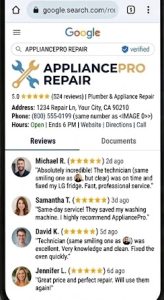
- Real reviews prominently displayed. Not a testimonial section at the bottom that says “Great service! – John D.” That’s meaningless. You need real Google reviews, with star ratings, displayed where people can see them immediately. Ideally with your overall rating and review count.
- Clear licensing and insurance information. State your license number if your state requires it. Mention that you’re insured. This sounds obvious, but half the appliance repair websites we audit don’t mention either one.
- Before/after photos or case examples. Show actual work you’ve done. Even simple photos of repaired appliances build credibility. It proves you actually do this work and don’t just talk about it.
- Response time promises. “We’ll call you back within 2 hours” or “Same-day service available” gives people confidence you’re responsive. Vague promises like “fast service” mean nothing.
- Pricing transparency (to the degree you’re comfortable). You don’t have to list exact prices for every repair. But if you can share your diagnostic fee, trip charge, or typical range for common repairs, it helps. People hate feeling like they’re walking into a mystery bill.
- Face of the business (owner/techs). A photo of you or your technicians makes you real. Stock photos of models in clean uniforms do the opposite. People want to see who’s actually going to show up at their door.
Google Business Profile Integration
Your Google Business Profile rating is one of your most powerful trust signals. If you have 4.8 stars and 200 reviews, that should be front and center on your website.
Use a review widget that pulls in your actual Google reviews automatically, or at minimum, display your rating prominently with a link to see all reviews.
Keep it current. If someone sees reviews from 2021 as your most recent, they’ll wonder if you’re still in business.
One warning: Don’t fake reviews or buy them. Google catches that eventually, and the penalty destroys your rankings. Real reviews from real customers are the only reviews worth having.
Call-to-Action Strategy: Where to Put Them and What to Say
A call-to-action (CTA) is anything on your website that tells visitors what to do next. Click here. Call now. Schedule service. Request a quote.
Most appliance repair websites either have no clear CTAs, or they bury them where no one sees them.
Here’s what actually works.
The Three Critical CTA Placements
Your website needs CTAs in three specific places:
- Above the fold in your header. “Above the fold” means the part of the page people see without scrolling. Your header should have a click-to-call button or phone number displayed prominently. This is non-negotiable for mobile users.
- After trust signals in mid-page content. Once someone has scrolled down and seen your reviews, credentials, or service descriptions, give them an immediate way to act on that confidence. “Ready to schedule? Call us now” with a button right there.
- After service descriptions at the bottom. Once they’ve read about what you do, make the next step obvious. Don’t assume they’ll scroll back up to find your phone number.
Some owners worry this is “too pushy.” It’s not. People searching for appliance repair want to know how to contact you. Making it easy isn’t pushy. Making it hard is just bad business.
Phone Calls vs Forms: What Actually Works for Appliance Repair
Here’s a debate that comes up constantly: should you focus on getting phone calls or form submissions?
For appliance repair, phone calls almost always convert better.
Here’s why. Most appliance repair jobs start as emergency or semi-emergency situations. The homeowner wants to talk to a real person right now. They want to explain the problem. They want to know when you can come. They want to hear a human voice that reassures them you’re legitimate and available.
A contact form requires them to type out their problem, wait for a response, and hope you get back to them quickly. That’s fine for scheduled maintenance or non-urgent service, but it’s terrible for “my fridge stopped working and all my food is going bad.”
Our recommendation: prioritize phone calls. Make your phone number the most prominent CTA. If you want to offer a form as a backup option for people who prefer it, fine. But don’t make it the primary conversion path.
You can qualify leads better on the phone anyway. You can hear urgency in someone’s voice. You can ask clarifying questions. You can book the job right then instead of playing email tag.
CTA Copy That Converts
The words you use in your CTAs matter more than you think.
Bad CTA copy:
- “Contact Us”
- “Submit”
- “Learn More”
- “Get Started”
These are vague and generic. They don’t tell people what actually happens when they click.
Good CTA copy:
- “Call Now for Same-Day Service”
- “Schedule Your Repair”
- “Get a Quote in 2 Hours”
- “Tap to Call: (555) 123-4567”
See the difference? The good examples are specific. They tell you exactly what you’re getting and what happens next.
One more thing: include your actual phone number in the CTA when possible, especially on mobile. “Call Now: (555) 123-4567” performs better than just “Call Now” because it reduces friction. People can see the number and tap it in one motion.
Page Speed Kills Conversions (Or Saves Them)
Here’s a stat that should terrify any business owner relying on their website for leads:
For every additional second your page takes to load, your conversion rate drops by roughly 7%.
If your site takes five seconds to load instead of two, you’ve lost about 20% of your potential leads before anyone even sees your content.
Every Second of Load Time Costs You Leads
Mobile users are especially impatient. If your site doesn’t start showing useful content within three seconds, most people will hit the back button and try the next result.
You might have the best appliance repair service in your city, the best reviews, and the best prices. None of that matters if your website is too slow to load.
Think about this from the homeowner’s perspective. Their washing machine is flooding the laundry room. They search for “appliance repair near me” on their phone. Your site pops up. They tap it. And they wait. And wait.
Meanwhile, your competitor’s site loads instantly with a big “Call Now” button right at the top.
Who gets the call?
The Biggest Speed Killers on Appliance Repair Websites
Most slow appliance repair websites have one or more of these problems:
Oversized images. Someone uploaded photos straight from their phone at 5MB each. Those need to be compressed and optimized before they go on your site.
Too many plugins. If you’re on WordPress, every plugin you add slows things down. That social media feed widget, the fancy slider, the popup newsletter signup – all of that adds load time.
Cheap hosting. Bargain hosting plans put your site on overcrowded servers. When traffic spikes, your site crawls or crashes. Investing in better hosting is one of the highest-ROI moves you can make.
Auto-playing videos. If your homepage has an auto-playing background video, you’re killing your mobile load time. Just don’t do it.
Quick Speed Fixes You Can Do Today
You don’t need to be a developer to improve your site speed. Here are three things you can do right now:
Compress your images. Use a free tool like TinyPNG or Squoosh to reduce image file sizes by 70-80% with no visible quality loss. Re-upload them to your site.
Install a caching plugin. If you’re on WordPress, plugins like WP Rocket or W3 Total Cache can dramatically improve load times with minimal setup.
Test your speed. Go to Google PageSpeed Insights and run your site through it. It’ll tell you exactly what’s slowing you down and how to fix it.
If you’re not technical and this feels overwhelming, this is exactly the kind of thing a specialized agency handles for you. But even if you’re DIY’ing it, these three steps will make a noticeable difference.
What Your Appliance Repair Service Pages Must Answer
Your homepage gets people in the door. Your service pages close the deal.
Most appliance repair websites have service pages that are just lists of brands or types of appliances. That’s not enough.
Your service pages need to answer the specific questions running through a homeowner’s mind when their appliance breaks.
What Homeowners Actually Want to Know
When someone lands on your “Refrigerator Repair” page, here’s what they’re thinking:
“Do you fix my specific brand?” They don’t just want to know you repair refrigerators. They want to know if you fix Samsung, LG, Whirlpool, or whatever they have sitting in their kitchen.
“How fast can you come?” Are you available today? Tomorrow? Next week? Uncertainty makes people keep shopping.
“What’s this going to cost?” They don’t need an exact quote on your website, but a range or typical pricing helps them understand if they’re in the right ballpark.
“Are you legitimate?” This comes back to trust signals. Licensing, reviews, and proof you’ve done this work before.
Service Page Template That Converts
Here’s a simple template that works for appliance repair service pages:
Clear headline: Include the service and your location. “Refrigerator Repair in [City]” or “Expert Dryer Repair Services.”
Brief explanation of what you fix. List the brands you work on. Mention common problems you solve (won’t cool, making noise, leaking, etc.). Keep it simple and scannable.
Trust signals embedded. Your Google rating, years in business, number of repairs completed. Right there on the service page, not just on your homepage.
Clear CTA. After someone reads about your service, tell them exactly what to do next. “Call us now for same-day refrigerator repair: (555) 123-4567.”
FAQ section for each service. Answer the most common questions about that specific appliance. “How long does a typical refrigerator repair take?” “Do you repair commercial refrigerators?” “What if you can’t fix it?”
This template works because it mirrors the actual decision-making process in someone’s head. You’re not just dumping information. You’re guiding them toward feeling confident enough to call.
Local SEO and Your Website Work Together (Or Don’t)
Your website doesn’t exist in isolation. It needs to work together with your Google Business Profile, your local citations, and your overall local SEO strategy.
When these things are aligned, you rank better and convert better. When they contradict each other, Google gets confused and your rankings suffer.
Your Website Should Reinforce Your Google Business Profile
The most basic but most commonly broken rule: your business name, address, and phone number (NAP) must be identical everywhere online.
If your Google Business Profile says “ABC Appliance Repair,” your website header shouldn’t say “ABC Appliance Repair & HVAC.” If your GBP lists your address as “123 Main St,” your website shouldn’t abbreviate it as “123 Main Street.”
Consistency matters for local SEO. Google looks for these signals to verify your business is legitimate and matches across sources.
Your website should also include:
Service area pages. If you serve multiple cities, create a dedicated page for each one. “Appliance Repair in [City Name]” with real content about serving that area, not just copy-pasted generic text.
Schema markup. This is code that tells Google specific information about your business (hours, services, phone number, location). Most business owners don’t need to understand how to implement it, but your web developer or agency should.
Embedded map. Showing your location (or service areas) on a map builds trust and reinforces your local presence.
Service Area Pages That Actually Help
Here’s what makes a service area page effective versus spammy:
Good service area page:
- Real content about serving that specific city
- Mentions local landmarks or neighborhoods
- Different from your other service area pages
- Includes reviews or testimonials from customers in that area
- Has a clear CTA specific to that location
Bad service area page:
- Copy-pasted content with just the city name swapped out
- Thin content (100 words or less)
- No real value to someone reading it
- Feels like it exists just to rank for that city keyword
Google is smart enough to recognize the difference. If you’re going to create service area pages, put actual effort into making them useful.
How to Track Which Marketing Channels Produce Calls
Most appliance repair business owners have no idea which marketing channels actually produce leads.
They know they get calls. They just don’t know if those calls came from Google Ads, organic search, their Google Business Profile, Facebook, referrals, or something else.
Without tracking, you’re flying blind. You might be spending money on marketing that doesn’t work while neglecting the channels that do.
Call Tracking Numbers Let You See ROI
Call tracking is simple: you use different phone numbers for different marketing sources, and you can see exactly which source generated each call.
For example:
- One number on your website
- One number in your Google Ads
- One number on your vehicle wrap
- One number in your Local Services Ads
When someone calls, you know where they found you. You can listen to call recordings. You can see which campaigns produce the most leads and which ones waste money.
This is exactly what we set up for appliance repair clients through AMPRank. It’s one of the most valuable pieces of the entire system because it removes the guesswork.
You know your Google Ads spent $2,000 last month and produced 40 calls and 22 booked jobs. You know your SEO traffic generated 15 calls and 8 jobs. Now you can make smart decisions about where to invest.
Form Submissions and Goal Tracking
If you’re using contact forms on your website (even though we recommend prioritizing phone calls), you need to track those submissions as conversions in Google Analytics.
Google Analytics 4 (GA4) lets you set up goals for specific actions. When someone submits your contact form, that should trigger a conversion event. Same with clicking your click-to-call button.
This tells you which pages on your site are actually driving conversions and which ones people bounce from.
Some agencies also use heat mapping tools like Hotjar or Microsoft Clarity to see where people click, how far they scroll, and where they get stuck. This is more advanced, but it can reveal conversion problems you’d never spot otherwise.
The 5 Most Expensive Website Mistakes Appliance Repair Owners Make
Let’s talk about the mistakes that cost you the most money in lost leads and wasted marketing spend.
1. Choosing Template Sites That Don’t Convert
You can build a website on Wix, Squarespace, or GoDaddy for $20 a month. It’ll look fine. It won’t convert.
Why? Because those templates are built for generic businesses. They’re not built around appliance repair buyer psychology. They’re not optimized for the “stranger in my home” trust barrier. They’re not designed to convert mobile traffic into phone calls.
You get what you pay for. A cheap template might save you money upfront, but if it converts at 1% instead of 5%, you’re losing four out of every five leads that should have called you.
2. Hiding Your Phone Number
This one drives us crazy because it’s so easy to fix and so common.
Your phone number should be in your header. On every page. Big enough to see. Clickable on mobile.
Not in the footer. Not on a “Contact Us” page three clicks deep. Not hidden in a menu.
If someone has to hunt for your phone number, they’ll call someone else.
3. Ignoring Mobile Experience
We’ve said this a few times already, but it’s worth repeating because it’s the most common problem we see.
Test your website on your actual phone right now. Not just “resize your browser window to be smaller.” Actually pull out your phone and use your site like a customer would.
Is it fast? Can you easily find the phone number and tap it? Can you read the text without zooming? Are the buttons big enough to tap?
If any of those answers are no, you’re losing 75% of your potential leads to a bad mobile experience.
4. No Clear Service Area Information
People need to know if you serve their location. Don’t make them guess.
Your homepage should mention your service area. “Proudly serving [City] and surrounding areas” or “Appliance repair throughout [County].”
If you serve multiple cities, list them or link to service area pages.
If someone in a neighboring town isn’t sure whether you’ll come to them, they’ll call someone else who makes it obvious.
5. Letting Your Site Get Stale (Outdated Info)
Nothing kills credibility faster than outdated information.
If your homepage says “Summer Sale 2022,” it’s 2026 now. That tells visitors you don’t maintain your business well. Why would they trust you to maintain their appliances?
Same with old blog posts, outdated photos, or service descriptions that don’t match what you actually offer anymore.
Your website is your online storefront. If it looks abandoned, people will assume your business is struggling or unprofessional.
DIY vs Hiring a Professional: What Actually Makes Sense
Let’s be honest about when DIY works and when you need professional help.
When DIY Works
You might be able to handle your website yourself if:
You’re very small (1-2 techs). You’re not spending much on marketing yet. You have time to learn. Your lead volume is manageable with a basic site.
You have a tight budget but time to learn. You’re willing to spend 20-40 hours learning WordPress, SEO basics, and site optimization. That time investment might make sense early on.
You need a temporary solution while you grow. You’re just starting out and need something basic until you can afford professional help. A simple site is better than no site.
When You Need Professional Help
Here’s when DIY stops making sense:
You’re spending on ads but your website doesn’t convert. If you’re paying for Google Ads and your conversion rate is low, your website is the bottleneck. Fixing that is worth way more than you’ll spend on professional help.
You don’t have time to manage it. Your time is worth money. If you’re busy running repair calls and managing technicians, spending 10 hours trying to fix your website yourself costs you more than hiring someone.
You need tracking and integration. Call tracking, Google Analytics setup, conversion tracking, and integration with your Google Ads campaigns – this stuff requires expertise. DIY attempts usually end up broken or incomplete.
You want to focus on running repair calls. You didn’t start an appliance repair business because you love building websites. You did it because you’re good at fixing appliances. Let experts handle the marketing so you can do what you’re good at.
What to Look For in an Agency
If you’re hiring an agency to handle your website and marketing, here’s what actually matters:
Industry specialization. You don’t want a generic marketing agency that “does everything for everyone.” You want someone who understands appliance repair business flow, seasonal demand, and how homeowners actually search for this service.
Transparent pricing and deliverables. You should know exactly what you’re paying for and what you’re getting. Vague promises about “improving your online presence” are red flags.
Call tracking and ROI focus. If they can’t show you where your leads come from and which marketing actually produces revenue, you’re flying blind. Insist on tracking and reporting.
Integration with Google Ads and Local SEO. Your website shouldn’t exist in isolation. It needs to work with your Google Ads campaigns, your Google Business Profile, and your local SEO. Agencies that only “do websites” miss half the picture.
At Appliance Marketing Pros, we built AMPRank specifically because we got tired of watching appliance repair owners waste money on generic marketing that didn’t work. Everything we do is built around the specific challenges of this industry.
Your Next Steps to Optimizing Your Appliance Repair Website
Here’s a simple action plan you can start today, whether you’re DIY’ing or hiring help.
Quick Action Plan
- Test your site on mobile right now. Use your actual phone. Try to call your business from your website. Is it easy? Is it fast?
- Add click-to-call buttons above the fold. If your phone number isn’t clickable and prominent in your header, fix that today. It’s the fastest conversion improvement you can make.
- Update your review displays. Make sure your Google rating and recent reviews are visible on your homepage. If you don’t have many reviews yet, start asking every satisfied customer to leave one.
- Check your page speed. Run your site through Google PageSpeed Insights. Fix the biggest problems first (usually oversized images).
- Set up basic tracking. At minimum, install Google Analytics 4 on your site so you can see where your traffic comes from and which pages people visit before they convert.
When You’re Ready for Expert Help
If you’re serious about turning your website into a consistent lead generation machine, here’s what we do differently at Appliance Marketing Pros.
We don’t just build you a website and disappear. We build conversion-optimized websites as part of AMPRank, our complete marketing system that includes:
- Website design and optimization specifically for appliance repair
- Google Ads management (search only, no display network waste)
- Local SEO and Google Business Profile optimization
- Call tracking so you know exactly where leads come from
- Regular reporting and strategy adjustments
Everything is built around one goal: predictable, consistent lead flow that you can actually track back to revenue.
We work exclusively with appliance repair, HVAC, and vent cleaning companies. We understand your business model, your seasonal patterns, your customer psychology, and what actually converts in this industry.
If you’re tired of throwing money at marketing that doesn’t work, or if you’re ready to scale past the “feast or famine” lead flow, let’s talk.
Book a Strategy Call with Appliance Marketing Pros
On the call, we’ll:
- Review your current website and marketing
- Identify what’s working and what’s costing you leads
- Show you exactly what we’d do differently
- Give you a clear plan (whether you work with us or not)
No pressure. No sales pitch. Just clarity on what it takes to turn your website into a lead generation asset instead of a digital business card.
Call us at (888) 360-2282 or visit ApplianceMarketingPros.com to schedule your strategy call.
Your website should be your best employee: working 24/7, answering questions, building trust, and booking jobs while you sleep. If it’s not doing that yet, it’s time to fix it.