
Blog
Stopping Google Maps Spam and Fake Appliance Repair Listings
If you search for “appliance repair near me” in most U.S. cities right now, you’ll see something frustrating. Mixed in with real, legitimate repair companies are fake listings, spam profiles, and businesses that don’t actually exist.
These fake listings aren’t just annoying. They’re stealing your calls, confusing your customers, and pushing your real business down in the rankings. And if you’re an appliance repair owner trying to grow, this spam problem is costing you money every single day.
The good news? You can fight back. Google is cracking down harder than ever, and there are specific steps you can take to report spam, protect your profile, and reclaim your spot in the local pack.
This guide will show you exactly how to identify spam, report it the right way, and use spam fighting as part of your overall strategy to rank higher and get more calls.
Why Google Maps Spam Is a Bigger Problem for Appliance Repair Companies
Spam isn’t evenly distributed across industries. Appliance repair gets hit harder than most because:
High local search volume. People search “refrigerator repair near me” or “dishwasher repair” thousands of times per month in major metros. That attracts spammers looking for easy money.
Low barrier to entry. Anyone can create a fake Google Business Profile in minutes. They don’t need a real shop, a truck, or even a technician.
Lead arbitrage operations. Many spam listings are designed to collect phone calls and sell them to real contractors as shared leads. You’re competing against businesses that don’t actually do the work.
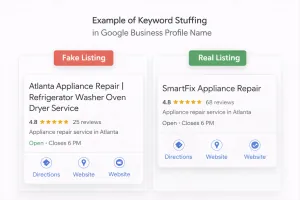
Keyword stuffing in business names. You’ve probably seen profiles like “Best Appliance Repair Near Me 24/7 Emergency Service.” Those violate Google’s guidelines, but they still rank because Google’s filters don’t catch everything.
Virtual offices and fake addresses. Some spam profiles use UPS stores, residential addresses, or completely fabricated locations to appear legitimate.
The result? Real appliance repair companies with actual trucks, technicians, and years of experience get buried under fake competitors. Your Google Business Profile ranking drops. Your call volume becomes inconsistent. And homeowners who need help end up calling scammers or lead sellers instead of you.
What Google Maps Spam Actually Looks Like
Before you can fight spam, you need to know what you’re looking for. Here are the most common types of spam profiles targeting appliance repair searches:
Keyword-Stuffed Business Names
Legitimate business name: “Johnson Appliance Repair”
Spam business name: “Appliance Repair Near Me | Same Day Service | 24/7 Emergency”
Google’s guidelines are clear. Your business name should match your real-world business name. Adding keywords, service areas, or promotional language violates policy. But spammers do it anyway because it works until someone reports it.
Fake or Hidden Addresses
Some profiles show an address that doesn’t match any real business location. Others hide the address entirely but still claim to serve your city. If you drive to the address and find a vacant lot, a residential home, or a mailbox store, it’s spam.
Suspicious Phone Numbers
Watch for profiles using:
Call tracking numbers that redirect to lead sellers
VoIP numbers with no local area code
Numbers that ring to a call center, not a local shop
Disconnected or non-working numbers
Real businesses use real phone numbers. Spam operations rotate numbers or use forwarding systems to hide their identity.
Copied or Stock Photos
If the profile photos look like generic stock images, or if you see the same photos used across multiple profiles, that’s a red flag. Legitimate companies show real trucks, real technicians, and real job sites.
Fake or Manipulated Reviews
Some spam profiles have dozens of 5-star reviews posted within a few days, often with generic text like “Great service, highly recommend!” Real reviews come in gradually and include specific details about the service.
No Website or Low-Quality Website
Many spam profiles either have no website listed, or they link to a one-page site with no real content, no service area details, and no company history. Real appliance repair companies usually have a website that explains who they are and what they do.
How to Report Google Maps Spam the Right Way
Google gives you tools to report spam, but most business owners don’t use them correctly. Here’s the step-by-step process that actually works:
Step 1: Document the Spam Profile
Before you report anything, gather evidence:
Take screenshots of the business name, address, and phone number
Screenshot the photos (especially if they’re stock images)
Note the category the profile is using
Check if the address is real using Google Street View
Save any reviews that look fake
This documentation helps Google’s review team understand what they’re looking at. It also protects you if the spammer tries to retaliate by reporting your profile.
Step 2: Use the “Suggest an Edit” Feature

On the spam profile, click “Suggest an edit” and report the specific violation:
For keyword-stuffed names, suggest the correct business name (if you know it) or flag it as spam
For fake addresses, mark the location as incorrect
For fake categories, suggest a more accurate category or report it as not a real business
Google reviews these suggestions, but they don’t always act quickly. That’s why you need to use multiple reporting methods.
Step 3: Report Through Google Maps
Click on the spam profile, scroll down, and select “Report a problem.” Choose the most accurate option:
“This place doesn’t exist”
“Incorrect information”
“Spam or fake”
Be specific in your description. Instead of just saying “this is spam,” explain why. For example: “This business name violates Google’s guidelines by including keywords. The address is a UPS store, not a real appliance repair shop.”
Step 4: Use the Google Business Profile Redressal Complaint Form

For serious violations, use Google’s official redressal form:
Go to https://support.google.com/business/contact/business_redressal_form?sjid=11348823612073417762-NC
Fill out the form with the spam profile’s details
Explain the policy violation clearly
Include your documentation
This form is designed for cases where spam is directly harming your business. Google takes these complaints more seriously than standard reports.
Step 5: Report to Local Consumer Protection Agencies
If the spam profile is actively scamming customers, report it to:
Your state’s Attorney General office
The Better Business Bureau
The Federal Trade Commission (ftc.gov)
This won’t remove the Google listing directly, but it creates a paper trail. If enough people report the same scammer, Google is more likely to take action.
Step 6: Follow Up
Google doesn’t always respond to spam reports. If you don’t see action within two weeks, report the profile again. Persistence matters. Some spam profiles get removed after the third or fourth report.
What Not to Do When Fighting Google Maps Spam
Fighting spam the wrong way can backfire. Avoid these mistakes:
Don’t leave fake negative reviews on spam profiles. Google will remove your review and may penalize your own profile. Fight spam through official channels, not review manipulation.
Don’t spam the spammer. Some owners try to report a spam profile dozens of times in one day. That doesn’t speed up Google’s review process and may flag your account as abusive.
Don’t ignore spam in your category. Even if a fake listing isn’t ranking above you right now, it could be soon. Report it early before it gains traction.
Don’t assume Google will act quickly. Spam removal can take weeks or even months. Keep reporting, but don’t rely on it as your only strategy.
Don’t violate Google’s policies yourself. Some owners think they need to stuff keywords in their own business name to compete. That puts your profile at risk of suspension. Stay compliant.
How to Protect Your Own Google Business Profile From Spam Tactics
Fighting other people’s spam is important, but protecting your own profile matters just as much. Here’s how to keep your listing secure:
Verify Ownership Immediately
If you haven’t verified your Google Business Profile, do it now. Unverified profiles are vulnerable to hijacking. Spammers can request ownership, change your information, and redirect your calls.
Go to google.com/business and follow the verification process. Google will send a postcard to your business address with a code. Enter that code to confirm ownership.
Enable Two-Factor Authentication
Secure your Google account with two-factor authentication. This prevents someone from accessing your profile even if they get your password.
Monitor Your Profile Weekly
Check your Google Business Profile at least once a week for unauthorized changes:
Business name edits
Address changes
Phone number updates
Category changes
Deleted photos or posts
If you see something you didn’t change, revert it immediately and report it to Google.
Respond to Reviews Quickly
Active profiles are harder to hijack. Respond to reviews, post updates, and keep your profile engaged. Google’s systems recognize active management and are less likely to approve unauthorized edits.
Use Google Posts Regularly
Post updates, photos, and offers at least once a week. This signals to Google that you’re the legitimate owner and keeps your profile active in the algorithm.
Add High-Quality Photos
Upload real photos of your trucks, your team, and your completed jobs. The more authentic content you have, the harder it is for spammers to impersonate you.
How Spam Fighting Fits Into Your Overall Local SEO Strategy
Reporting spam isn’t just about removing bad listings. It’s part of a larger strategy to dominate local search results for appliance repair in your area.
Here’s how spam fighting connects to everything else:
Spam Removal Improves Your Ranking
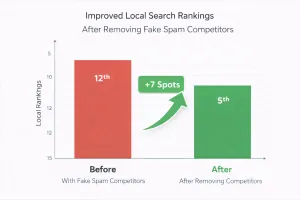
When fake listings get removed, there’s less competition in the local pack. If you’re ranking #4 and the #2 and #3 listings are spam, removing them moves you up.
Clean SERPs Build Trust
When customers search for appliance repair and see only legitimate businesses, they’re more likely to call. Spam-filled results make the entire industry look sketchy.
Reporting Spam Signals Authority
Google tracks who reports violations. Consistently reporting accurate spam signals that you’re an active, engaged business owner who understands the platform. That can indirectly help your profile’s credibility.
It Protects Your Reputation
Some spam profiles use names similar to real businesses to confuse customers. If someone gets scammed by a fake profile that sounds like your company, your reputation suffers. Removing those profiles protects your brand.
It Levels the Playing Field
Spam profiles often use black-hat tactics to rank higher. By removing them, you create a fairer competitive environment where legitimate SEO and service quality matter more than keyword stuffing.
What to Do If Your Own Profile Gets Falsely Reported
Sometimes competitors or spammers retaliate by reporting legitimate profiles. If your Google Business Profile gets suspended, here’s what to do:
Stay Calm and Don’t Panic
Suspensions happen to real businesses all the time. Most can be resolved if you follow the right process.
Review Google’s Guidelines
Make sure your profile actually complies with Google’s policies. Check your business name, address, categories, and website. If you violated a rule (even accidentally), fix it before appealing.
File a Reinstatement Request
Go to support.google.com/business and file a reinstatement request. Explain why your business is legitimate and provide evidence:
Business license
Photos of your storefront or truck
Proof of your business address
Links to your website and social media
Be Patient
Reinstatement can take several weeks. Google’s review team is slow. Keep following up, but don’t spam them with multiple requests.
Get Help If Needed
If your suspension isn’t resolved after 30 days, consider hiring a specialist who understands Google Business Profile reinstatements. Some cases require detailed documentation and persistent follow-up.
Why Google Is Cracking Down Harder on Maps Spam in 2025 and 2026
In March 2025, Google filed a lawsuit against a network of fake Google Business Profile creators. This marked a major shift in how seriously Google is taking spam enforcement.
The lawsuit targeted operations that created thousands of fake profiles, sold them to scammers, and manipulated rankings across multiple industries. Appliance repair was one of the hardest-hit categories.
What this means for you:
Google is investing more resources in spam detection. Automated filters are getting better at catching fake profiles before they go live.
Manual reporting is more effective. Google’s review teams are more responsive now than they were two years ago.
Repeat offenders face legal action. If you’re running spam profiles, you’re not just risking suspension. You’re risking lawsuits.
Legitimate businesses have more leverage. If you report spam with clear evidence, Google is more likely to act quickly.
This enforcement trend is good news for real appliance repair companies. The playing field is slowly getting cleaner.
When to Handle Spam Yourself vs. When to Get Help
Most appliance repair owners can handle basic spam reporting on their own. But some situations require professional help:
Handle It Yourself If:
The spam is obvious (keyword-stuffed names, fake addresses)
You have time to document and report
The spam profile has low engagement and few reviews
You’re comfortable navigating Google’s reporting tools
Get Professional Help If:
Your profile was suspended and you can’t get it reinstated
A competitor is using sophisticated spam tactics
You’re dealing with a network of fake profiles targeting your city
You don’t have time to manage reporting and follow-ups
Spam fighting is getting more complex. If you’re spending hours every week dealing with fake listings instead of running your business, it’s worth bringing in someone who specializes in local SEO and Google Business Profile management.
How Appliance Marketing Pros Helps Clients Fight Spam and Rank Higher
At Appliance Marketing Pros, we don’t just report spam. We build systems that keep your Google Business Profile secure, optimized, and ranking consistently.
Here’s what that looks like:
Monthly spam audits. We monitor your local pack for new spam profiles and report them before they hurt your rankings.
Profile security and monitoring. We track your Google Business Profile for unauthorized changes and respond immediately.
Strategic profile optimization. We optimize your business name, categories, photos, and posts to maximize visibility without violating Google’s policies.
Review management. We help you generate authentic reviews that build trust and improve rankings.
Integration with Google Ads and SEO. Spam fighting is just one piece. We combine it with search ads, local SEO, and call tracking to create predictable lead flow.
If you’re tired of losing calls to fake listings, or if your Google Business Profile ranking has dropped and you don’t know why, let’s talk.
Take Control of Your Google Maps Presence Today
Spam isn’t going away, but you don’t have to let it control your business. By reporting violations, protecting your profile, and staying consistent, you can reclaim your spot in the local pack and get the calls you deserve.
Start by auditing the top 10 appliance repair listings in your city. Identify the spam. Document it. Report it. Then optimize your own profile so you’re not just competing, you’re dominating.
And if you want help building a system that handles spam, SEO, and Google Ads all in one place, we’re here for that.
Ready to stop losing calls to fake listings? Book a free strategy call with Appliance Marketing Pros. We’ll audit your local competition, identify spam, and show you exactly how to rank higher and get more calls. No fluff, just a clear plan built for appliance repair companies.