
Blog
The Right Way to Build City Pages for Wealthy Service Areas
If you run an appliance repair business and you’ve been told to create “city pages” to rank better on Google, you’ve probably seen two extremes.
One group says city pages are the secret to dominating local search. The other group says they’re spam and Google will penalize you for using them.
Both are partially right.
The truth is this: city pages work when they’re built correctly for the right reasons. They fail when they’re built as thin templates stuffed with keywords and fake local references.
And for appliance repair businesses targeting wealthy service areas, the difference between a strategic city page and a spammy one can mean the difference between landing $2,500 Sub-Zero service calls and wasting months on pages that never rank.
This guide will show you the right way to build city pages that attract high-value customers in affluent markets without triggering Google penalties.
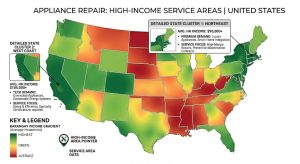
Why Wealthy Service Areas Require a Different Approach
Not all service areas are created equal.
A $150 washing machine repair in a working-class neighborhood operates on completely different economics than a $1,200 built-in refrigerator repair in a gated community.
Wealthy service areas have distinct characteristics that change how you should approach local SEO:
Higher ticket averages. Affluent homeowners own premium appliances. Wolf ranges, Sub-Zero refrigerators, Miele dishwashers. These aren’t $89 service calls. They’re $300 to $2,500+ jobs with better margins.
Lower price sensitivity. High-income customers care more about speed, professionalism, and expertise than finding the cheapest option. They’re searching for “Sub-Zero repair near me,” not “cheap appliance repair.”
Better close rates. When someone in a $1.5 million home calls about their broken wine cooler, they’re ready to book. They’re not calling six companies to negotiate price.
Longer customer lifetime value. Wealthy households own more appliances and maintain them proactively. One relationship can generate $5,000+ over several years.
Less spam competition. Most fly-by-night operators can’t afford to target these areas effectively. The competition is smaller but more sophisticated.

This creates a specific SEO opportunity: if you can rank for location-specific searches in affluent zip codes, you’re not just getting more leads. You’re getting better leads with higher conversion rates and larger invoices.
But you can’t rank with generic template pages that say “We serve [City Name]” 47 times.
Google sees through that immediately.
What Makes a City Page Spam vs. Strategic
Google’s Webmaster Guidelines are clear: they don’t want doorway pages created solely to rank for search queries without adding unique value.
Here’s how to tell the difference.
Spam city pages look like this:
- Identical content with only the city name swapped out
- No real connection to the local area beyond repeating location keywords
- Created in bulk using automation or templates
- No unique images, testimonials, or service data
- Thin content that doesn’t answer the searcher’s question
- Built only to manipulate rankings, not to help users
Strategic city pages look like this:
- Unique content that reflects real service experience in that area
- Specific references to neighborhoods, landmarks, or local context
- Service area maps showing actual coverage zones
- Testimonials or case studies from customers in that city
- Data about response times or service volume in that area
- Built to help users understand your coverage and expertise
The difference comes down to intent and execution.
If you’re building 50 identical pages and swapping city names, that’s spam. If you’re creating 5 to 10 genuinely useful pages for your core service areas with real local insights, that’s strategy.
The Wealthy Service Area City Page Framework
Here’s the exact framework we use when building city pages for appliance repair companies targeting high-income markets.
Step 1: Choose Service Areas Based on Economics, Not Ego
Don’t build a city page for every town within 30 miles of your shop.
Build pages for the areas that generate the highest revenue per call.
Start by pulling your service data from the past 12 months. Look at:
- Average ticket size by zip code
- Close rates by area
- Customer lifetime value by region
- Drive time vs. revenue ratio
You’ll quickly see patterns. Some areas consistently produce $800+ jobs. Others max out at $200 and require 45-minute drives.
Focus your city pages on the top 5 to 10 areas that deliver the best combination of ticket size, close rate, and proximity.
For most appliance repair businesses, this means targeting:
- Established affluent suburbs
- Gated communities or country club areas
- Neighborhoods with homes built in the last 10 to 20 years
- Areas with high concentrations of luxury appliances
If you’re not sure where to start, look at median household income data and home values. Areas where the median home price is $750,000+ are usually strong targets.
Step 2: Build Unique, Value-Driven Content for Each Area
Once you’ve identified your target service areas, you need to create genuinely useful content for each one.
This is where most companies fail. They use a template, swap the city name, and wonder why Google ignores the pages.
Here’s what actually works.
Write a custom introduction that demonstrates local knowledge.
Good example: “We’ve been serving homeowners in Westlake since 2018, with most of our calls coming from the Vaquero and Bella Flora communities. If you own a Sub-Zero, Wolf, or Thermador appliance in this area, you’ve probably noticed that most general appliance repair companies don’t stock the parts or have the training to service high-end brands properly.”
Bad example: “Looking for appliance repair in Westlake? Our team provides fast, affordable appliance repair services to Westlake residents.”
The difference is obvious. One sounds like a real person who actually works in that area. The other sounds like an SEO robot.
Include service area specifics that prove you operate there.
Add details like:
- Neighborhoods you serve most frequently
- Common appliance brands in that area
- Typical response times from your location
- Any service restrictions or coverage notes
Example: “We typically arrive in the Westlake area within 90 minutes of your call during business hours. Our service area includes Vaquero, Bella Flora, Scenic Hills, and the Trophy Club corridor.”
This type of specificity builds trust and signals to Google that the page has real local value.
Showcase testimonials or case studies from that city.
If you’ve done work in that area, feature it prominently.
Even one or two real customer quotes with first names and neighborhoods (with permission) will outperform 10 generic five-star reviews pulled from your Google Business Profile.
Example: “Just had Michael and his team repair our Sub-Zero refrigerator. They diagnosed the compressor issue quickly and had it running the same day. Highly recommend for anyone in Vaquero.” — Jennifer S., Westlake
Add a service area map showing your coverage radius.
Use a simple embedded Google Map or a custom service area graphic showing the specific neighborhoods you cover from that location.
This helps users understand your coverage at a glance and reinforces that you’re not just keyword-stuffing the city name.
Step 3: Optimize for Local Search Signals Without Over-Optimizing
City pages need to send clear local relevance signals to Google, but you can’t force it.
Here’s how to optimize naturally.
Title tag format: [Service] in [City] | [Brand Differentiator] | [Company Name]
Example: “Sub-Zero Repair in Westlake | Factory-Trained Technicians | Appliance Marketing Pros”
Meta description: Write for clicks, not keyword density. Mention the city, highlight your value proposition, and include a call to action.
Example: “Expert Sub-Zero and Wolf appliance repair in Westlake. Factory-trained technicians, same-day service, and premium parts in stock. Call now for fast scheduling.”
H1 heading: Keep it simple and relevant.
Example: “Appliance Repair in Westlake, TX”
URL structure: Use clean, descriptive URLs.
Example: yoursite.com/service-areas/westlake-appliance-repair
Body content keyword usage: Mention the city name naturally throughout the page, but don’t force it into every sentence. Aim for 4 to 8 mentions in a 600 to 800-word page, placed where they make sense contextually.
Internal linking: Link to relevant service pages (Sub-Zero repair, refrigerator repair, etc.) and to other city pages in nearby areas.
Schema markup: Add LocalBusiness schema with your service area defined. Include your NAP (name, address, phone), service types, and coverage area.
Step 4: Add Trust and Conversion Elements
A city page isn’t just about ranking. It’s about converting visitors into booked calls.
Make sure every city page includes:
A clear call to action above the fold. “Call now for same-day service in Westlake: (555) 123-4567”
Social proof. Testimonials, Google review ratings, years in business, certifications.
Visual credibility. Photos of your team, your service vehicles, or completed jobs in that area.
Easy contact options. Click-to-call buttons, contact forms, and text options for mobile users.
Response time expectations. Let them know when you can typically arrive in their area.
High-income customers want speed and professionalism. If your page looks like a 2008 keyword-stuffed landing page, they’ll leave and call someone else.
Step 5: Avoid the Most Common City Page Mistakes
Even well-intentioned city pages can fail if you make these mistakes.
Mistake 1: Building too many pages too fast.
If you suddenly publish 40 city pages in one week, Google will assume you’re spamming. Roll out pages gradually over weeks or months.
Mistake 2: Using identical content with find-and-replace city names.
Google’s algorithms can detect duplicate content patterns across pages. Every city page must have unique content.
Mistake 3: Targeting areas you don’t actually serve well.
Don’t build a city page for a town 90 minutes away if you rarely go there. It won’t convert and it damages trust.
Mistake 4: Ignoring mobile optimization.
Most appliance repair searches happen on mobile. If your city page isn’t fast and mobile-friendly, you’ll lose calls.
Mistake 5: Never updating the pages after launch.
City pages aren’t set-it-and-forget-it. Add new testimonials, update service area notes, refresh content periodically. Google rewards fresh, maintained content.
How to Measure if Your City Pages Are Working
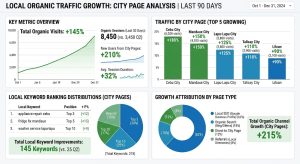
You built the pages. Now you need to know if they’re actually driving results.
Track these metrics for each city page:
Organic impressions and clicks (Google Search Console). Are people finding the page in search results? Is it ranking for your target keywords?
Conversion rate. How many visitors call or fill out a form? A city page with 100 visitors and 5 calls is outperforming a page with 500 visitors and 2 calls.
Average ticket size from that area. Use call tracking or CRM data to tie leads back to the source page and measure revenue per area.
Ranking positions. Track where your city pages rank for “[city name] appliance repair” and related terms. Use a rank tracker or manually check every 30 days.
Time on page and bounce rate. If visitors land on your city page and leave immediately, the content isn’t relevant or engaging enough.
Give your city pages at least 90 to 120 days to gain traction. Local SEO isn’t instant. But if a page isn’t showing any improvement after six months, audit the content, links, and technical setup.
When to Build City Pages vs. When to Focus Elsewhere
City pages are powerful, but they’re not always the right move.
Build city pages if:
- You have a solid foundation (strong Google Business Profile, decent website, clear service offerings)
- You serve multiple distinct service areas with meaningful search volume
- You can commit to creating unique, high-quality content for each area
- You’re targeting affluent markets with high-value customers
Focus elsewhere if:
- Your Google Business Profile isn’t optimized yet
- Your website has major technical issues
- You only serve one city or a very small radius
- You’re relying on city pages to fix poor service quality or reputation issues
City pages amplify an already functional SEO strategy. They don’t replace foundational work.
Why Appliance Repair Businesses in Competitive Markets Need This Approach
If you’re competing in Dallas, Houston, Phoenix, or any major metro with dozens of appliance repair companies, you can’t afford to rely on generic SEO tactics.
Every competitor is optimizing their Google Business Profile. Most are running Google Ads. Many are buying leads from Angi or HomeAdvisor.
Strategic city pages targeting wealthy service areas let you bypass the price-driven competition and focus on high-value customers who care about expertise, speed, and quality.
When someone in a $2 million home searches “Wolf range repair near me,” you don’t want to compete with 10 other companies offering $89 diagnostics. You want to show up as the specialist who serves their neighborhood, understands their appliances, and can arrive today.
That’s what well-executed city pages deliver.
Take the Next Step
If you’re ready to dominate local search in your most profitable service areas, city pages are one of the most effective tools available.
But they only work when they’re built with real strategy, local relevance, and a focus on the customer experience.
At Appliance Marketing Pros, we’ve helped appliance repair companies across the country build city page strategies that rank, convert, and drive consistent high-value calls. We understand the appliance repair business model, the competitive landscape, and what actually moves the needle for owner-operators and growth-stage companies.
If you want to stop competing on price and start attracting premium customers in affluent markets, let’s talk.
Schedule a free strategy call and we’ll walk through your current service areas, identify your highest-value opportunities, and show you exactly how a properly executed city page strategy can grow your revenue without adding more trucks or techs.